How to set up a fixed-price project
There are things to pay attention to when planning fixed-price projects.
Written By Matti Parviainen
Last updated About 1 month ago
For fixed-price billing, the total contract value is agreed upfront. Revenue isn't driven by hours tracked — it's determined by the budget and the revenue recognition method you choose. This means there are specific things to set up correctly and pay attention to throughout the project lifecycle.
Setting up a fixed-price project
1. Create the project and set the billing type
When creating or editing a project, set the billing type to fixed-price. This tells Operating that revenue comes from budgets rather than from individual time entries.
2. Choose a revenue recognition method
When you select fixed-price as the billing type, Operating asks you to choose a revenue recognition method. This determines how earned revenue is calculated — i.e., how much of the budget value has been "earned" at any point during the project.
There are three methods:
2A. Based on time planned or tracked, weighed by hourly rates — Distributes budget value proportionally based on the weighted value of each person's work. A senior consultant's hours carry more weight than a junior's, based on their billing rates. This is the only method that attributes revenue to individual people, which makes per-person profitability reports meaningful.
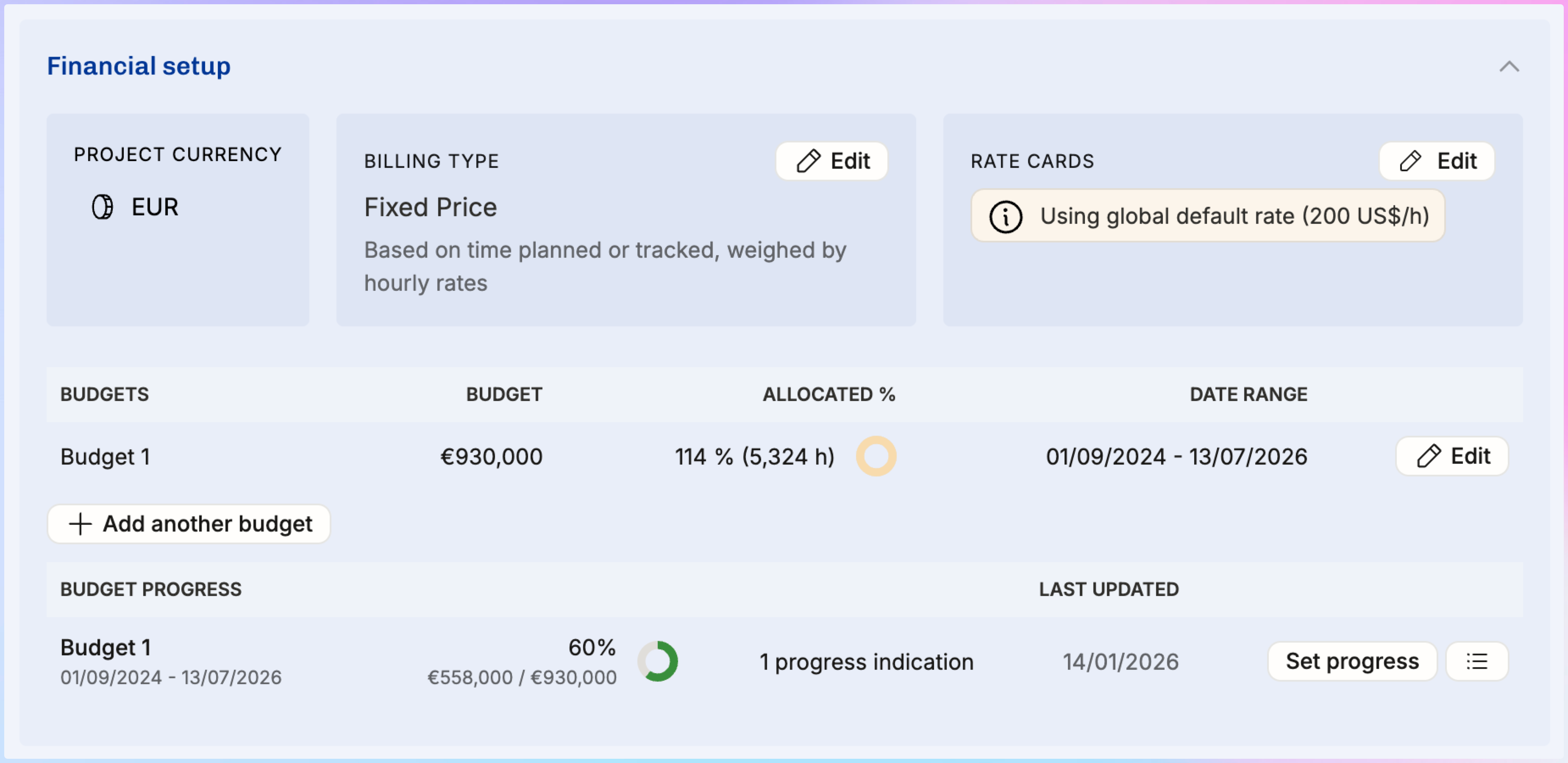
Set budget progress — In order to recognize revenue early on in the project, you manually enter a completion percentage, and Operating calculates earned revenue from that. Gives you full control. Requires discipline to update regularly — many firms do this monthly as part of their month-end close. Read more here How to run a month-end close.
2B. Based on actual vs planned costs (cost-to-cost) — Calculates the budget's completion from the cost incurred so far as a share of the planned cost for the budget period, capped at 100%, and recognizes that share of the budget value. Revenue goes to billable time entries and expenses weighted by their cost. Operating updates it automatically, so you don't set progress by hand. This option appears when your organization tracks costs, and it works best when cost follows delivery progress closely.
2C. Evenly by month or week — Divides the budget value equally across every month in the budget's date range. Simple and predictable. Works well for retainer-style engagements with roughly uniform work.
For a deeper explanation of how each method works, when to use it, and how it affects reports, see How revenue recognition works in Operating.
The forecast for the method you pick also follows your organization's Fixed-price forecast method setting — see How to choose a fixed-price forecast method.
3. Add budgets
A fixed-price project needs at least one budget for revenue recognition to work. The budget defines the total revenue value and the date range over which it is earned.
To add a budget, go to the project's Financial setup section. Each budget has a value (in the project's currency), a start date, and an end date.
Start with a single budget covering the full project duration. Only split into multiple budgets if you genuinely have distinct phases or contract amendments with different values and timelines.
Rules to keep in mind:
Budgets may not overlap in time. Each date can only fall within one budget.
The sum of all budgets equals the total project value.
Work tracked outside of any budget's date range earns zero revenue. The hours still show up as costs, but the project earns nothing for that period. This is a common source of margin surprises — make sure your budget dates cover the full period when work is expected.
Once a budget's end date has passed, Operating treats it as 100% complete. The full budget value counts as earned revenue automatically. You don't need to manually set progress to 100% on completed budgets.
4. Set up positions and allocations
Staff the project the same way as any other project: create positions, assign people (or leave positions open for staffing), and add allocations. See How to staff a project from scratch for the full workflow.
For fixed-price projects, allocations are especially important because they drive revenue forecasting. If you're using the "weighted by hours and rates" revenue recognition method, the planned allocations determine how future revenue is distributed across people and months.
If rates and costs are set up, you'll be able to see the gross margin of your plan before the project even starts. This is a good moment to check whether the planned team composition and timeline will deliver acceptable profitability.
Before delivery: sales and planning
You're most likely pulling the deal value from your CRM — make sure the project plan in Operating matches the latest scope.
Build in buffer. Fixed-price means you absorb overruns. A 10–20% buffer for scope creep is common. Include it in your planning, either as extra hours in allocations or as budget contingency.
Structure payment milestones around deliverables, not just time. Front-load payments if possible (30–40% upfront is reasonable). Set up your invoicing schedule to match these milestones. Read more about invoicing: How to run the invoicing process end to end.
Establish a change order process before signing the contract. Define how scope changes are requested, evaluated, and priced. This makes it easier to handle the inevitable changes during delivery — see "Changes to the fixed price" below.
During delivery: monitoring the project
Follow project hours closely, even though the number of hours doesn't directly affect how much you invoice. The hours determine whether you're making money.
What to check regularly:
Planned vs. actuals — Are people tracking more or fewer hours than planned? The Projects report in Reports shows this at a glance. See Understanding planned vs. actuals for how to read these numbers.
Gross margin — In the project's Financial status section, check whether the margin is holding up. If tracked costs are growing faster than earned revenue, the project is becoming less profitable.
Budget burndown — Are you consuming budget faster than expected? If the team is tracking significantly more hours than allocated, you may need to either adjust allocations, reduce scope, or accept lower margin.
Billable vs. non-billable split — Are team members marking too many hours as non-billable? For fixed-price projects, this doesn't reduce revenue (the budget value is fixed), but it does signal that effort is being spent on things outside the planned scope.
If you're using the "based on budget progress" revenue recognition method, update the progress percentage at least monthly. Some firms include this as a step in their month-end close process. Read more: How to run a month-end close.
Note: if the project isn’t completed in time and you need to stretch the allocations into the future, make sure to also adjust the budget’s end date. This way the revenue earning is tied to the work done over the longer period of time.
After delivery: closing out
In the project details, you can see the effective hourly rate — what the project actually paid per hour of work, calculated from the budget value divided by total hours tracked. This is valuable for benchmarking and pricing future fixed-price deals.
The project will stay visible in the Invoicing list until you've invoiced the full budgeted amount. Once all invoicing is complete, the project can be archived.
Review the project's final financials for lessons learned: Was the margin acceptable? Did the team composition match the plan? Were there scope changes that should have been priced differently? These insights feed directly into better estimates on the next deal.
Changes to the fixed price
Scope changes are normal in consulting. Make sure to add extra work as tentative first, then confirm allocations when the client approves the change.
Operating supports two approaches:
Separate project for the additional budget
If the additional work is uncertain or substantial, keep it as a separate tentative project. Plan the budget, schedule, team, and allocations there.
Once the client greenlights the change, merge the additional project into the ongoing confirmed project. Budgets and allocations transfer cleanly — just make sure the budget date ranges don't overlap with existing budgets.
This approach keeps your confirmed project's financials clean until the change is approved.
Tentative allocations inside the same project
For smaller changes, add new allocations as tentative directly in the existing project.
When the change is agreed upon:
Update the project budget (add a new budget for the additional period, or increase the existing budget value)
Change all related allocations from tentative to confirmed
Budgets don't have their own status
A note that sometimes causes confusion: budgets themselves don't have a confirmed/tentative status. The revenue from budgets is treated as confirmed if the project status is confirmed. The confirmed vs. tentative distinction lives on allocations, not on budgets.
Related articles
How revenue recognition works in Operating — a deep explanation of each revenue recognition method
Understanding planned vs. actuals — how planned revenue/costs compare to actuals
How to create and send an invoice — invoicing workflow for fixed-price projects
How to run a month-end close — includes budget progress updates
How to set up rate cards — billing rates that drive the "weighted by hours/rates" method
How to staff a project from scratch — positions and allocations setup