HubSpot CRM
Import HubSpot deals to streamline your staffing process
Written By Mikko Karjalainen
Last updated 4 months ago
Overview
The HubSpot integration for Operating streamlines your resource planning by automatically importing HubSpot deals and creating for them linked projects in tentative status. This lets you start planning for the project as soon as it hits the correct stage in your HubSpot.
In addition to deals, the integration also imports companies and deal owners, keeping your data aligned across platforms. You have the option to keep syncing deal and client names from HubSpot, ensuring consistency without manual updates.
With powerful filtering options, you can control which deals are imported based on criteria like deal stage, pipeline, or custom properties—bringing in only the most relevant opportunities for your workflow.
Installation - Prerequisites
You have enough permissions in your HubSpot account to be able to install Marketplace apps
You have the manage integration and data import permission for your user in Operating
Step 1: Connect to HubSpot and install the app
To start the process of installing the HubSpot integration, go to the HubSpot Integrations page in Operating and click Connect HubSpot. This takes you to your HubSpot account to choose which HubSpot account you want to link to your Operating.
Deals are imported to Operating only after you save the configuration after choosing which pipelines and stages contain deals which should be imported.
Step 2: Select which pipelines you want to sync to Operating

After you’ve connected your HubSpot account to Operating, you are able to configure how exactly deals, companies and users are imported into Operating. The integration automatically creates deals from projects which fit the criteria you define next.
The first choice is to select the pipelines from which you want to import deals.
Step 3: For each pipeline, select which stages should trigger project creation in Operating
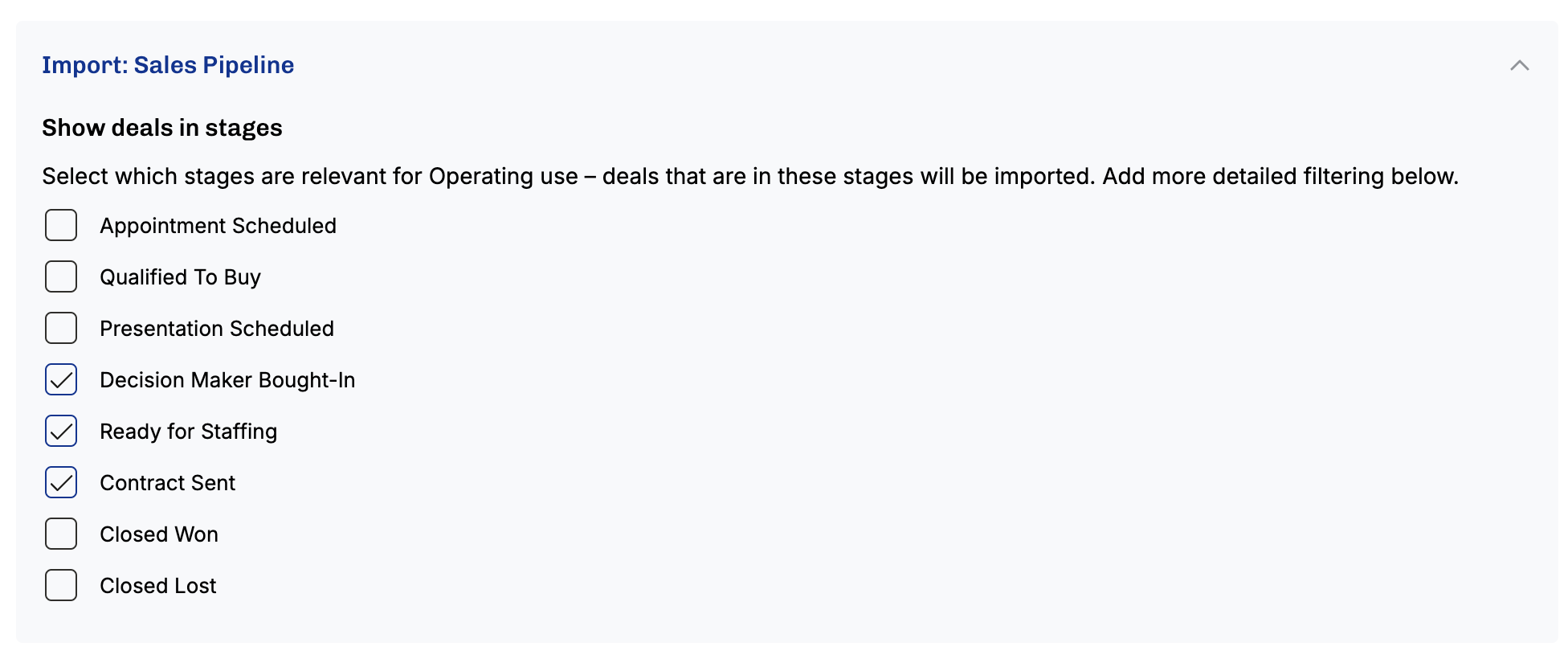
Next, you should select which stages are relevant for Operating. Deals will be imported to Operating, and a project will be created for them, whenever they hit one of these changes unless you specify additional filters in the next section.
You must choose at least 1 stage to import deals
Step 4: Preview what deals would be imported and add additional filters if necessary
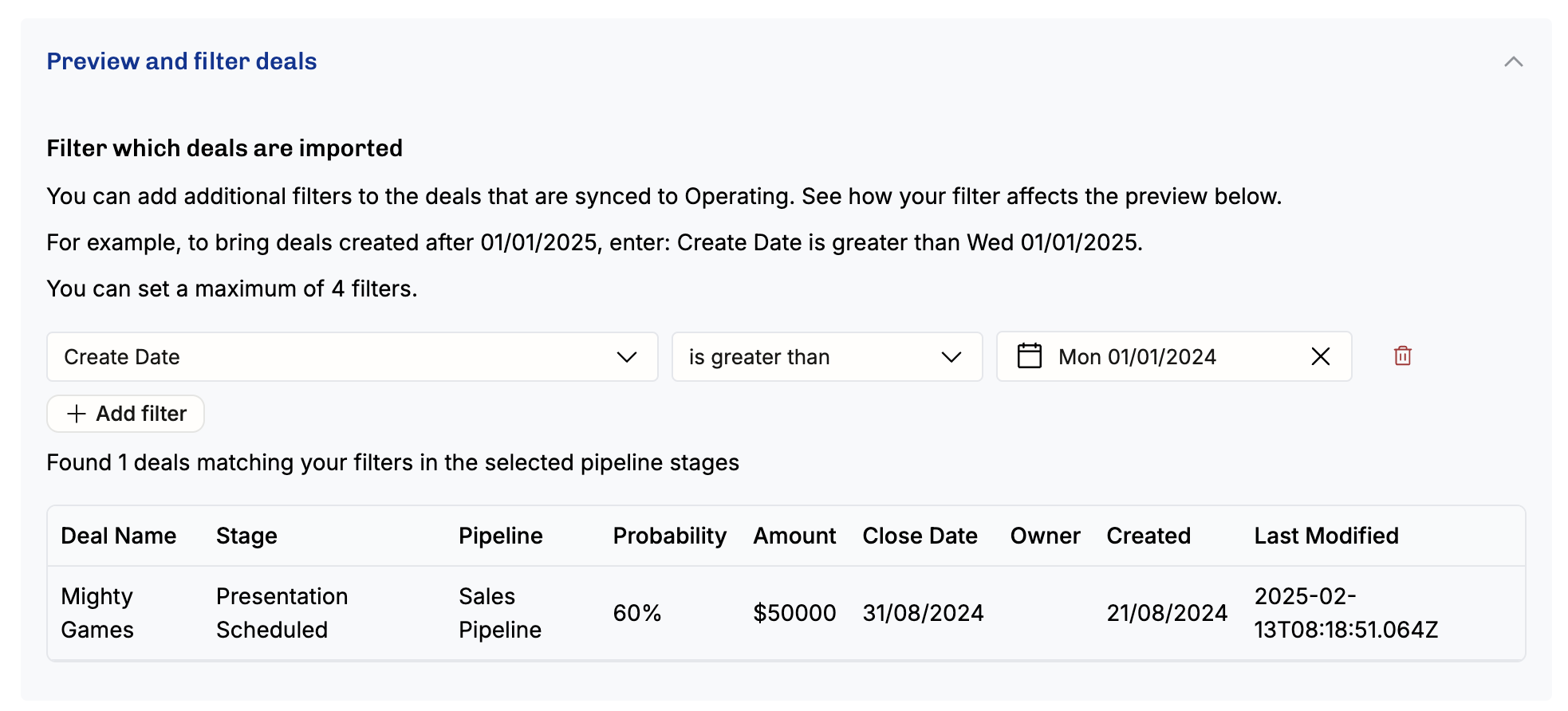
After selecting at least one stage, the preview table shows a list of deals in your HubSpot that currently fit the criteria you defined. If a large number of deals fits the criteria, the table only shows the most recently updated ones and the number above the table shows the total number of matching deals.
Step 5: Map additional fields
To reduce the need for manual data entry across multiple systems, we allow you to map additional properties from HubSpot deals and companies directly into Operating. This way, your sales team can input all relevant project information in HubSpot, and the corresponding metadata will automatically be available in Operating. This ensures a smooth handover to the delivery and staffing teams, who rely on accurate and complete data to do their jobs efficiently.
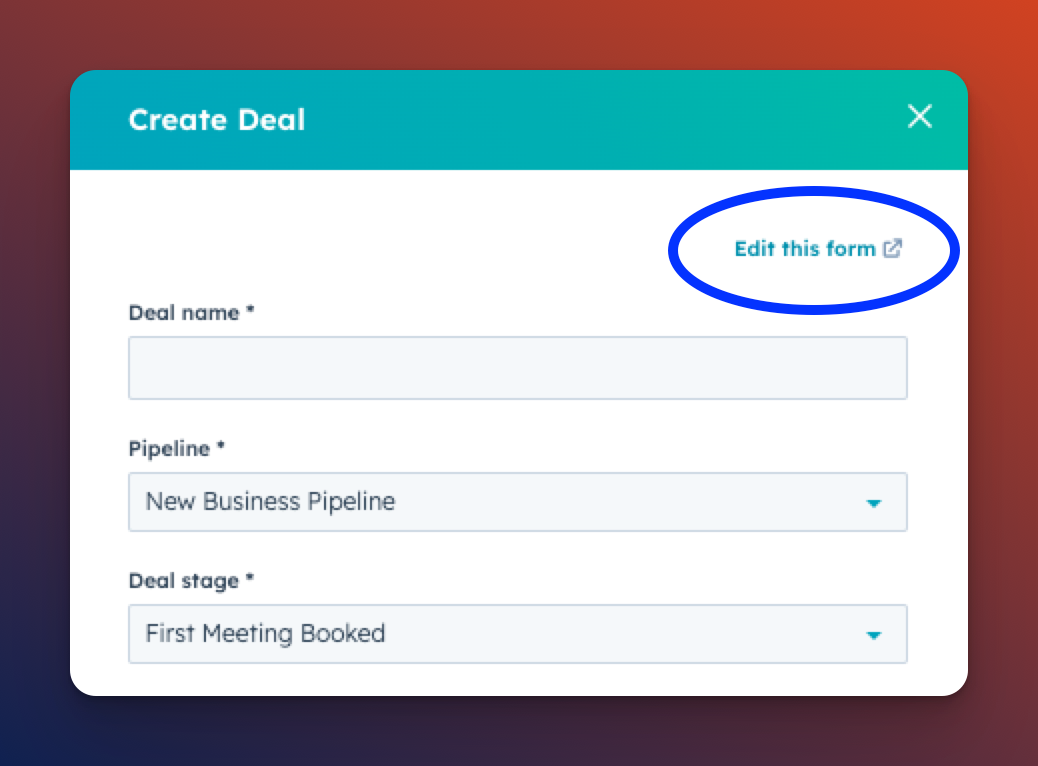
In order for the additional mapping to work, you might need to create custom properties for your deal and company objects in HubSpot. You might then want to add these properties to the Add Deal form in HubSpot. Click Edit this form on the Create Deal Form in HubSpot to add your custom properties on the form.
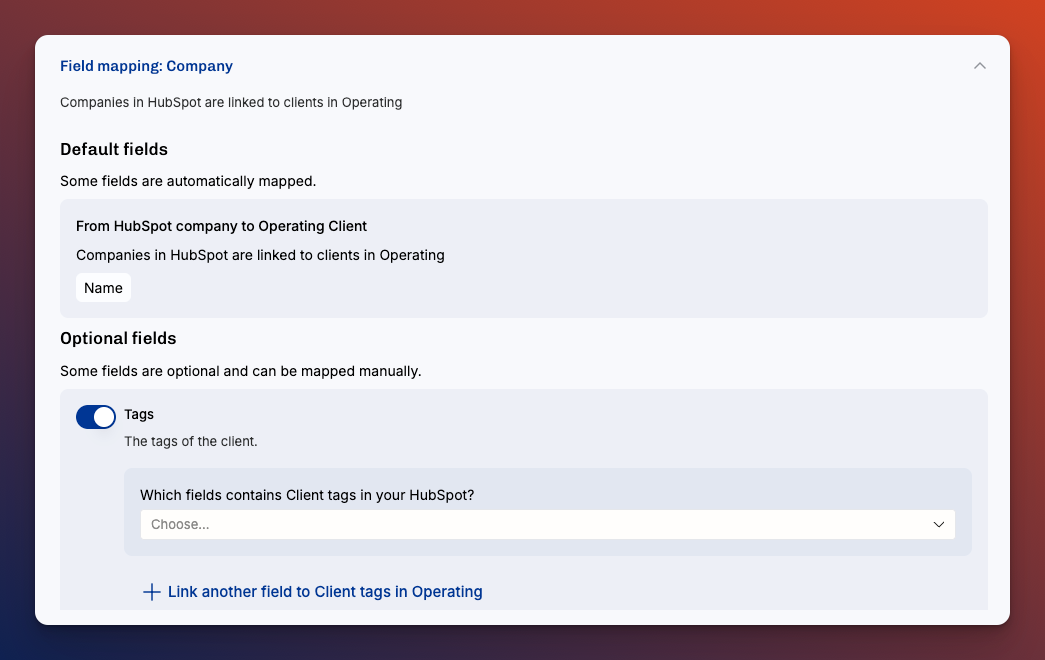
Mapping HubSpot Company Properties to Clients in Operating
In the Company field mapping screen, you can map properties from a HubSpot Company to a Client in Operating.
Default fields like the company name are automatically mapped.
Company/client Tags can be manually linked to custom fields in Operating. This gives you flexibility to bring in more context about the client, such as segmentation, internal notes, or regional details.
Mapping HubSpot Deal Properties to Projects in Operating
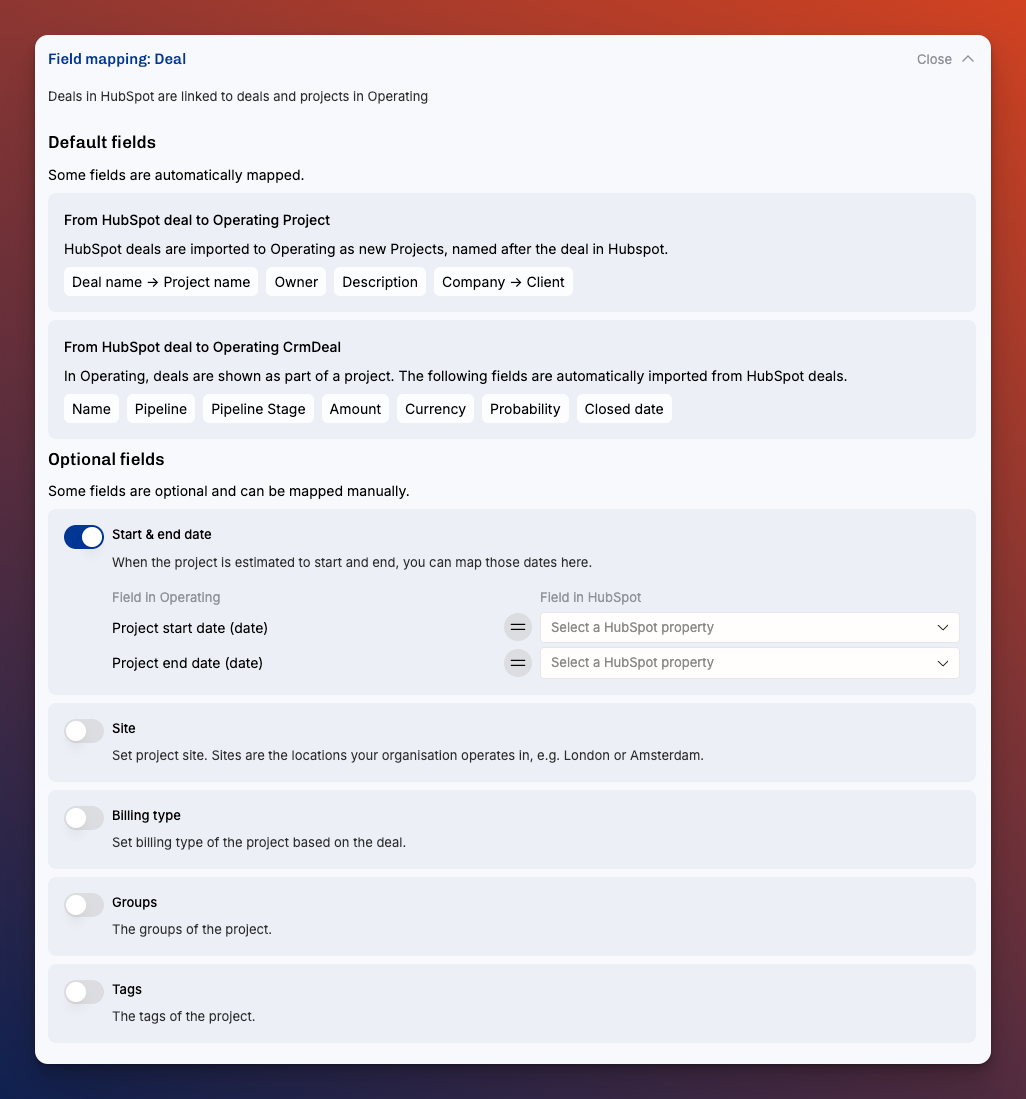
In the Deal field mapping screen, you can map properties from a HubSpot Deal to both Projects and CRM Deals in Operating. (Note that CRM deals are not editable in Operating, but are only a reference to the HubSpot deal, and can be used to group data in different views)
Default fields such as deal name, owner, description, company, and key CRM fields like amount, probability, and closed date are automatically mapped to the project.
Optional fields like project start and end date, site, billing type, groups, and tags can be configured manually to bring in more project-specific data from HubSpot into Operating.
Mapping the HubSpot Deal Amount to Operating Project Budget
You can also map a deal field — typically the deal amount — to a project Budget. Operating creates the budget in the deal's currency, creating the currency in your organization if it does not exist yet. This is what makes imported fixed-price deals arrive with a budget already in place for revenue forecasting.
Enjoy consistent data from HubSpot to Operating!
Step 6: Save configuration and import deals
After you’re happy with your configuration, click save and Operating runs an initial import for you. After this updates will be handled automatically and projects will be created for deals when they match the criteria you defined. You’re good to go!
Key functionality
Importing deals as tentative projects
When a deal is created or updated in HubSpot, it’s automatically imported into Operating as a project in tentative status. This allows your team to start planning resources before a deal is fully closed, ensuring smoother transitions from sales to execution.
Sync Companies and Deal Owners
Companies associated with imported deals are also brought into Operating keeping client records aligned. The integration only imports companies from HubSpot when a deal for them is imported.
Deal owners (HubSpot users assigned to deals) are imported as Project Owners, ensuring clear visibility into account ownership within your resource planning. If the Deal Owner is not yet a person in Operating, a new person will be created upon syncing the deal.
Optional: Project & Client name sync
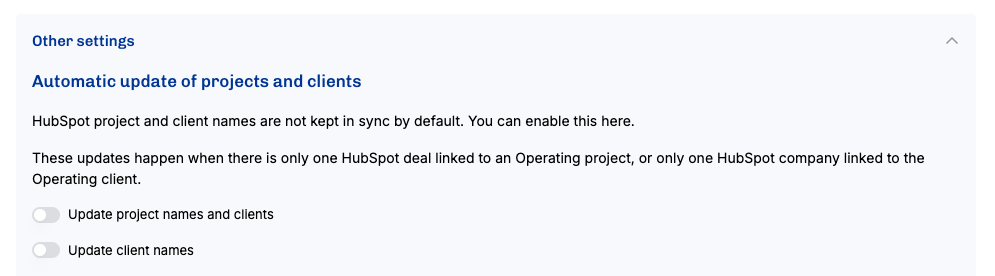
You can choose to keep project names and client names in sync with HubSpot. If enabled, any updates to a deal or company name in HubSpot will automatically update the corresponding project and client in Operating, reducing manual data entry, as long as there is only one deal associated to a given project, or only one company associated with a given organization.
FAQ
Can I import standard or custom Deal fields to Projects?
Yes. In Step 5 (Map additional fields) you can map standard and custom HubSpot deal and company properties to Operating fields — including project start and end dates, site billing type, groups, and tags. You may need to create custom properties in HubSpot first.
Why do I have duplicate clients or people in Operating after connecting HubSpot to Operating?
If you already have existing clients Operating, the HubSpot integration doesn’t try to manually connect companies from HubSpot to clients in Operating. Instead, it simply creates new ones which you can safely merge with your existing clients in Operating. The same applies for HubSpot users and people in Operating.
Was this helpful?
Still need help? Ask the team