How Operating calculates earned and forecasted revenue
Written By Matti Parviainen
Last updated 2 months ago
This article explains the three revenue numbers you see on projects, the portfolio, and reports:
Earned revenue — revenue recognized from work and expenses that have actually happened ("actuals").
Planned revenue — revenue expected from the plan (allocations and planned expenses).
Forecasted revenue — a single best estimate of total revenue, made by combining earned revenue so far with the remaining plan.
How each is calculated depends on the project's billing type and, for fixed-price projects, its revenue recognition method. We cover every combination below.
The building blocks
A few concepts feed every calculation:
Budget — the contracted amount for the project (a project can have more than one budget, each with its own date range).
Allocations — planned assignments of people to the project over time. These drive the plan.
Time entries and expenses — the actual work logged and costs incurred. These drive the actuals.
Rates — each person has a billing rate (what their time is worth to the client) and a cost rate (what their time costs you). Both come from rate cards / cost settings.
Budget progress — recognition indications on the budget that say "this much of the budget has been earned as of this date." Earlier indications lock in the earned amount for the period leading up to them; everything after the last indication is handled by ongoing ("running") recognition.
Important: "Cost-weighted" and "completion %" mechanics described in the earned-revenue sections below apply only to the cost-to-cost method — the default fixed-price method earns revenue in steps. Forecasting is a separate matter: your organization's fixed-price forecast method decides whether forecasted revenue is shaped by a completion % as well, and that applies to both methods. Watch for the method labels in each section.
Billing types at a glance
The rest of this article focuses on fixed price, which is where the recognition methods and the earned/planned/forecast machinery come into play.
Earned revenue (actuals) — fixed price
Conceptually, the project's timeline is split into two parts by the last budget progress indication:
1. Up to the last indication — "by progress"
Each budget-progress indication sets a fixed amount earned for the period leading up to it. The amount for a period is the increase from the previous indication (progress amounts are cumulative, so a indication at €60k following one at €40k means €20k earned in that period). When an indication sits below the one before it, that period earns €0 and the difference is carried by a negative revenue correction — see Reducing progress below.
That fixed amount is recognized in full — there's no proportional scaling — and then distributed across the time entries and expenses in the period:
Default method ("weighted by hours and rates"): the amount is distributed by each entry's billable value (rate × hours). Expenses are taken first, at their invoice amount (capped to the period's amount), and whatever remains is spread across time entries.
Cost-to-cost: the amount is distributed by each entry's cost (cost rate × hours for time; billable cost for expenses), with time and expenses pooled together.
If a period has no entries to attach revenue to, the amount is held as "unattributed revenue" on the indication rather than lost.
2. After the last indication — "running" recognition
The leftover budget (budget total − last indication amount) covers the period from the day after the last indication to the end of the budget. How much of it is earned so far depends on the method:
Default method ("weighted by hours and rates"): the remaining budget is recognized only once that period has fully ended (the budget's end date passes) or you set another indication. While the period is still open, no revenue is attributed to it yet — even if work has been logged. When it is recognized, the full remaining budget is distributed by billable value (expenses first, then time entries). There is no day-by-day completion ratio. In practice this means earned revenue under the default method moves in steps: it jumps at each indication and when the budget completes, rather than accruing continuously.
Cost-to-cost: the system computes a completion % = actual costs ÷ planned costs since the last indication, clamped between 0% and 100%, and earns
completion % × remaining budget— so earned revenue accrues continuously as costs are incurred. "Actual costs" includes both time-entry costs and expense costs. This earned amount is then distributed cost-weighted across the entries. (Once a budget's period has fully ended, it's treated as 100% complete regardless of the cost ratio.)
Earned revenue with the "evenly" methods
Evenly by week / Evenly by month ignore the per-person mechanics above entirely:
The budget is spread evenly across the calendar weeks/months the budget covers. Partially-covered weeks/months are prorated by the number of days included.
Revenue is attributed at the project level only — it is not attributed to the people who logged time, and planned expenses receive no revenue.
Rate cards act purely as a planning aid here; they don't affect recognition.
This applies to both earned and forecasted revenue.
Budget progress indication: how they work
Budget progress is the mechanism behind earned revenue for the default ("weighted by hours and rates") method — but the workflow differs by method, and it's a common source of confusion.
Setting progress manually (default method)
For the default method, you record progress yourself, and the dialog gives you a starting point: a new indication opens with the percentage pre-filled from the suggested progress — the time value tracked so far (hours × rate) as a share of the forecasted total time value. Open "How is this calculated?" to see the numbers behind it. The suggestion appears when you can see the project's revenue figures; on cost-to-cost projects it comes from tracked cost against forecasted cost, and needs access to costs. From a project's financials (the "Set progress" / "Add progress indication" action on a budget), you:
Pick a date (it must fall inside the budget's date range — the budget's own start and end are implicitly treated as 0% and 100%).
Enter either a percentage or an amount — the two are linked, so entering one fills in the other ("Enter either percentage or amount - they are linked").
A few rules to know:
The amount you enter is cumulative — it's the total earned as of that date, not the increment since the last indication. So a project that goes 40% → 70% is recorded as two indications of €40k and €70k (on a €100k budget), and the second indication earns the €30k in between.
Each indication must be no greater than the next one and no greater than the budget, and it can't be negative. Only one indication per day. An indication normally sits at or above the one before it; an indication that falls below the previous one is a progress reduction, which is allowed only as the newest entry on the budget and needs a note — see Reducing progress below.
Until you set a indication (or the budget period ends), no revenue is attributed to that stretch of work. This is by design for the weighted method — it's why a fixed-price project can show logged time but €0 earned revenue until you mark progress.
A note is required for a reduction. As soon as the amount you type drops below the previous indication, the Note field is labelled "Note (required)", and the entry won't save without one.
The dialog warns you before you save. While the typed amount is below the previous indication, a warning box names the previous amount and its date, and the size and date of the negative revenue correction the reduction will create. You see the correction before you commit to it.
Cost-to-cost: progress is automatic
For cost-to-cost, you do not set indications. Progress is computed automatically from tracked costs vs planned costs every time the figures are recalculated — there are no stored indications behind it. As the in-app help puts it: "Cost-to-cost revenue recognition weights revenue based on costs. The budget progresses automatically as tracked costs accumulate against planned costs — no manual progress entries are needed. Completed budgets always have 100% progress even if actual costs are over or under planned costs."
(The "Set progress" action is still technically available on these projects, but manual indications aren't part of the intended cost-to-cost workflow.)
Provisional and set months on cost-to-cost
Cost-to-cost progress moves with tracked costs, so a month's recognized revenue can keep changing after the month ends. The Revenue Recognition tab on a project shows this per month: the Recognized revenue card carries a small provisional or set label next to the figure.
Provisional — no progress is recorded in that month or in any month after it, so the figure still follows tracked costs. The card's tooltip reads: "Recognized revenue calculated from cost-to-cost completion. It stays provisional and can still change until set progress is recorded on or after this month."
Set, from progress in the month itself — the tooltip reads: "Set progress was recorded this month. Recognized revenue for this month is based on it."
Set, from progress in a later month — a progress indication fixes every earlier month as well, not only the month it is dated in. The tooltip reads: "Set progress in a later month fixes recognized revenue for this month."
The labels apply to cost-to-cost projects with a recognized amount for the month. On the other methods the card simply reads "Recognized revenue for this month."
Evenly by week / month: no indications needed
The "evenly" methods spread the budget across the calendar automatically, so they don't rely on progress indications either.
When figures recalculate
Earned revenue is recalculated automatically whenever you add, edit, or delete a budget progress indication, and whenever the time entries or expenses on the project change. For cost-to-cost, changing tracked time or costs moves the completion % (and therefore earned revenue) on its own, with no indication needed.
Reducing progress: walking an indication back
Progress amounts are cumulative and normally only go up. But sometimes an earlier indication turns out to have been too optimistic — the client disputed a milestone, or a period was marked further along than it really was. You can walk progress back by recording a lower cumulative amount than the previous indication. That entry is a progress reduction.
The rules for a reduction are stricter than for ordinary progress:
It has to be appended at the end. The reduction's date must be later than every other indication on the budget. You can't slot a lower amount in between two existing indications — the entry is rejected with "The progress reduction date must be after the latest progress date." (For the same reason you can't later move or insert another indication into the gap directly before a reduction.)
A note is required. The Note field becomes "Note (required)" as soon as the amount you type drops below the previous indication, and the entry won't save without one.
Equal is not a reduction. An amount that matches the previous indication exactly counts as ordinary progress — only an amount strictly below it is treated as a reduction.
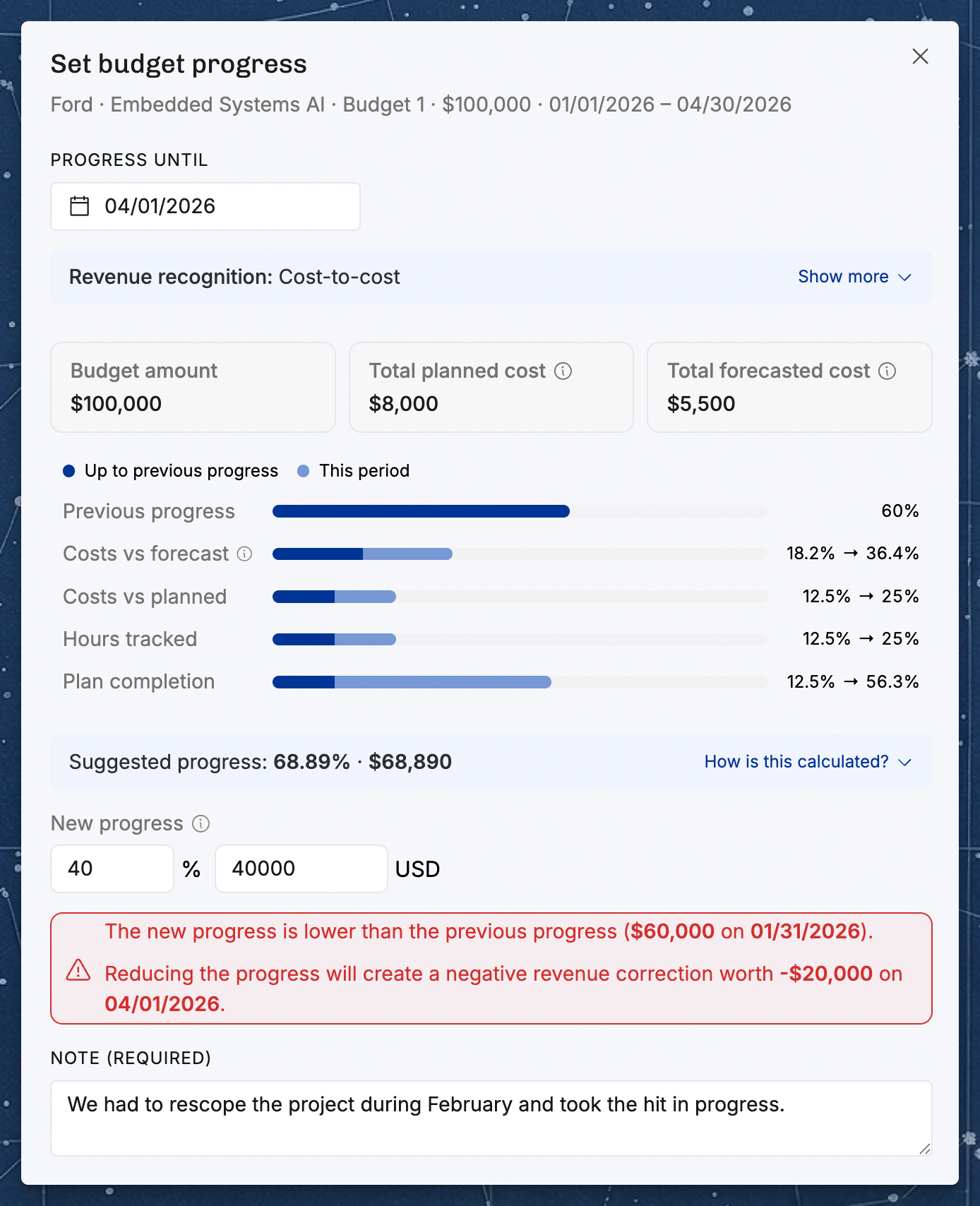
What it creates. Saving a reduction also creates a linked revenue correction: a manual, dated, signed adjustment to recognized revenue, with a required note. Its amount is the difference between the new cumulative amount and the previous one, so for a reduction it's always negative. It carries the reduction's date and note.
The progress entry itself never earns negative revenue. The period the reduction covers simply earns €0 — no negative amount is spread back over the time entries and expenses in it. The correction is the thing that carries the reduction, and the correction is what shows up in reports: it appears as its own "Revenue corrections" figure alongside work revenue and expense revenue, and as a dated, noted line in the month's drill-down. Total earned revenue is the recognized revenue plus the corrections.
A worked example
A €100,000 fixed-price budget runs 1 January – 30 June, on the default method.
31 January: an indication of 60% = €60,000. That €60,000 is recognized and distributed across January's time entries and expenses.
1 March: you discover January was over-recognized — the true position was 40%. You append a reduction: 40% = €40,000, with a note.
The reduction creates a revenue correction of €40,000 − €60,000 = −€20,000, dated 1 March, carrying that note.
Earned revenue now: €60,000 from the January indication, €0 for the 1 February – 1 March period the reduction covers, and −€20,000 from the correction — €40,000 in total, which is exactly the new cumulative position.
Remaining budget: €100,000 − €40,000 = €60,000, covering 2 March to 30 June as usual.
The indication before a reduction is locked
Once a reduction sits after an indication, that reduction's correction is calculated from the earlier indication's amount. So while the reduction exists:
The earlier indication's amount and date are locked — the fields are disabled in the dialog, and the server rejects a change with "The progress amount can't be changed while a later progress reduction depends on it." Everything else, including the note, can still be edited.
The earlier indication can't be deleted. Its Delete button is disabled, with the tooltip "Remove the later progress reduction before deleting this entry."
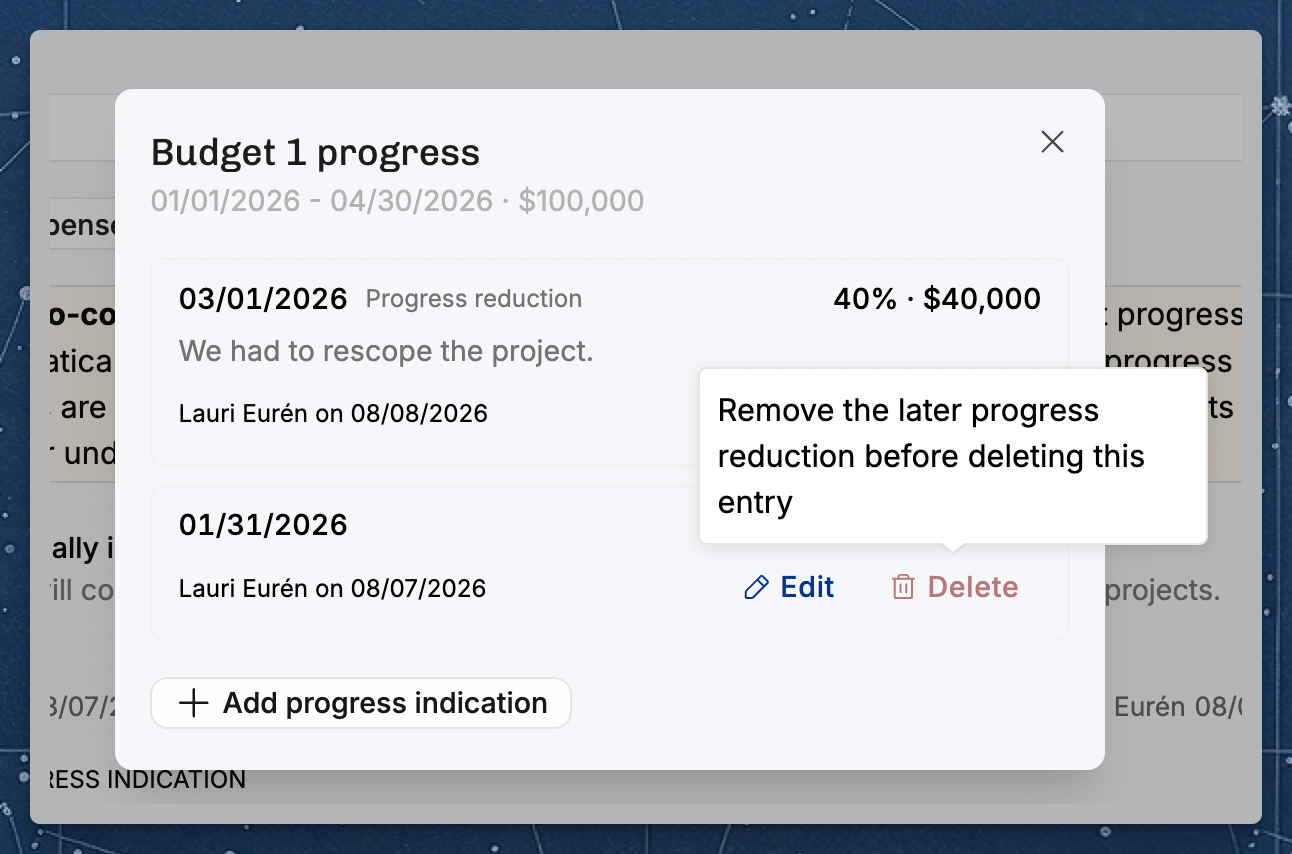
To change a locked indication, remove the reduction first. You can either delete the reduction — which deletes its correction with it — or edit the reduction's amount back up to (or above) the previous indication, which turns it back into ordinary progress and removes the correction. Either way the earlier indication unlocks, and earned revenue is recalculated.
Note: reductions apply wherever budget progress indications are used. On the default ("weighted by hours and rates") method, indications are always set manually. On cost-to-cost, progress is normally computed automatically from tracked costs — and moves down on its own if costs are corrected — but you can also record or edit an indication manually, and the same reduction rules apply. The "evenly" methods don’t use indications at all.
Planned revenue — fixed price
Planned revenue answers "if the plan plays out, how is the budget expected to be earned?"
The entire budget is recognized as planned revenue and distributed across the allocations and planned expenses that fall within the budget's dates.
The split follows the same weighting rules as actuals:
Default method: weighted by billable value (rate × planned hours), expenses first.
Cost-to-cost: weighted by planned cost, allocations and expenses pooled.
Evenly by week/month: spread evenly across the calendar; planned expenses get nothing.
With multiple budgets, each budget is distributed independently and matched to allocations/expenses by date. Anything dated outside every budget's range isn't recognized.
(For time & materials projects there's no budget distribution — planned revenue is simply rate × planned hours per allocation, plus planned expenses at their billable amount.)
Forecasted revenue — combining the two
Forecast (shown on the project portfolio, project list, and project detail page) is built around a cutoff date — typically the end of the last closed period (e.g. the end of the previous month):
Forecast = earned revenue up to the cutoff + remaining plan after the cutoff
Mechanically:
Up to the cutoff: take the earned revenue already recognized (whether from indications or running recognition).
After the cutoff: take the planned revenue, but scale it to the remaining budget — i.e.
budget − earned revenue up to the cutoff. The future plan is fit into whatever budget is left.
For a fixed-price project this means earned + forecast lands exactly on the contract budget. (Capped T&M scales to the remaining cap; plain T&M and the "evenly" methods are simply additive with no remaining-budget scaling.)
How the future periods are shaped for fixed-price Projects depends on your organization's Fixed-price forecast method — see How to choose a fixed-price forecast method.
Why the cutoff date matters
Cutoff = last closed month: the forecast is made of fully-closed actuals plus the remaining plan. Nothing in the open period is included on the actuals side.
Cutoff at a later date: more actuals are pulled in. For cost-to-cost, the recognition for the still-open period reflects the running completion % (actual vs planned costs since the last indication). For the default method, the open period's earned revenue is the distributed remaining budget as described above.
A note on terminology: Operating does not use a separate "estimate at completion" figure. The forecast is simply the recognized actuals through the cutoff plus the remaining budget spread over the future plan. Earned-revenue figures are recalculated whenever budget progress, time entries, or expenses change.
Under the absolute-progress forecast method, each period's forecasted revenue is split across the people and expenses in that period by the share of the completion basis each of them contributed — billable cost on cost-to-cost, billable time value (rate × hours) on the default method. A row that contributed nothing to the basis in a period carries no forecasted revenue for it.
A worked example
Take a €100,000 fixed-price project running January–February, with planned work split evenly (≈€50k of billable value planned in each month). It's now mid-February, and the forecast cutoff is the end of January (the last closed month).
Default method ("weighted by hours and rates")
At the end of January the project manager records a indication: 40% complete = €40,000. In January the team logged time worth €50,000 of billable value (say €35k for Alice, €15k for Bob).
Earned revenue today:
January (up to the indication): €40,000 is recognized — the indication sets the total, not the €50k of value tracked. It's split in proportion to billable value: Alice €40k × 35/50 = €28,000, Bob €40k × 15/50 = €12,000.
February (open, ends after today): the remaining €60,000 budget period is still open and has no indication, so €0 is earned yet — even though the team has already logged February time.
Total earned so far: €40,000.
This is the "steps" behaviour: earned revenue will stay at €40,000 until either a new indication is set or the budget completes at the end of February (at which point the remaining €60,000 is recognized).
Forecast (cutoff = end of January):
Earned up to the cutoff: €40,000.
Remaining budget: €100,000 − €40,000 = €60,000, which the February plan is scaled to fit.
Forecast total: €40,000 + €60,000 = €100,000 — exactly the contract budget, as always for fixed price.
Same project on cost-to-cost (for contrast)
Now suppose the project uses cost-to-cost instead, with a total planned cost of €60,000, and no manual indications. By mid-February, €36,000 of actual cost has been incurred.
Completion % = €36,000 ÷ €60,000 = 60%.
Earned revenue today = 60% × €100,000 = €60,000 — recognized continuously as costs are incurred, with no indication required.
Same budget, same calendar, same plan — but the default method shows €40,000 earned mid-February (the last indication) while cost-to-cost shows €60,000 (live cost progress). That difference is the heart of why the recognition method matters.
(Expenses follow the same logic: under the default method billable expenses are recognized first, up to the period's amount; under cost-to-cost they're pooled with time and weighted by cost.)
Quick reference
Common questions
My fixed-price project shows €0 earned revenue even though we've logged plenty of time. Why? On the default method ("weighted by hours and rates"), revenue isn't attributed to logged time until you set a budget progress indication or the budget's end date passes. Logged time alone doesn't move earned revenue — record progress to recognize it.
Earned revenue jumped up suddenly from one day to the next. Is that a bug? No — that's expected on the default method. Earned revenue moves in steps: it changes when you set an indication and when a budget completes, not gradually day by day. A step is normally up; a progress reduction steps it down, in the month the reduction is dated. (Cost-to-cost is the opposite — it moves gradually as costs are incurred.)
My cost-to-cost project shows progress I never entered. Where does it come from? Cost-to-cost calculates progress automatically from tracked costs vs planned costs. There are no manual indications behind it — the percentage updates whenever time or expenses change.
Earned + forecast equals exactly the budget. Shouldn't the forecast be able to go over or under? For fixed-price projects, the future plan is scaled to fit the remaining budget, so earned-to-date plus forecast always lands on the contract amount. If you expect to over- or under-run, that's reflected by adjusting the budget, not by the forecast drifting off it. (Time & materials forecasts can exceed any target, since they aren't budget-capped.)
Can cost-to-cost progress go above 100%? No. Completion is capped at 100% even if actual costs exceed planned costs. A fully completed budget is always treated as 100% earned, whether you came in over or under on cost.
Why don't individual consultants get revenue attributed on an "Evenly by week/month" project? Those methods attribute revenue at the project level only and spread it evenly across the calendar. They don't attribute to the people who logged time, and planned expenses receive no revenue. Rate cards there are only a planning aid.
Does changing the forecast cutoff date change my actuals? No. The cutoff only decides where the line is drawn between "earned so far" and "remaining plan." It doesn't change how any individual entry's revenue is recognized — that's driven by indications (or cost progress) and budget completion, which key off today, not the cutoff.
I typed a percentage when setting progress, but it saved an amount. Why? Percentage and amount are linked in the dialog for convenience, but only the amount (cumulative, in your project's currency) is stored. The percentage is recomputed from the amount and the budget whenever it's shown.
Why can't I set a indication on the budget's first or last day? The budget's start and end are implicitly 0% and 100%, so indications are only for the dates in between.
Was this helpful?
Still need help? Ask the team