How revenue recognition works in Operating
When do you earn the revenue? Who deserves what?
Written By Matti Parviainen
Last updated 13 days ago
When you sell work at a fixed price — or cap an hourly engagement at a maximum amount — you know upfront how much you can invoice. But how much of that revenue have you earned at any given point during the project? That is the question revenue recognition answers.
This article explains why revenue recognition matters, which billing types use it, how each method works, and how to choose the right one.
Why revenue recognition matters
For time-and-materials projects, revenue recognition is straightforward: every tracked hour generates earned revenue at the applicable billing rate. The revenue is earned when the work is done.
Fixed-price, capped time-and-materials and retainer projects are different. The amount you can invoice is tied to a budget agreed upfront, but the work is delivered over weeks or months. You need a method to determine how much of that budget value you have earned in any given period — especially when the project spans multiple financial reporting periods.
Without revenue recognition, your financials would show nothing earned until the final invoice, which does not reflect reality. Revenue recognition distributes the budget value across the project duration so that monthly reports, margin calculations, and planned vs. actuals comparisons are meaningful throughout the project's lifecycle.
Which projects use revenue recognition
Revenue recognition applies to the three billing types whose revenue is tied to a budget:
Fixed-price — the contract value is agreed upfront and earned over time. You choose a recognition method (see below).
Capped time and materials — work is billed hourly like time and materials, but total earned revenue cannot exceed the budget. There is one built-in recognition behavior. You do not choose a method.
Retainer — the client pays a fixed fee for each period, and each period is one budget. Operating spreads each period's fee evenly across the period's weekdays. You do not choose a method.
Time-and-materials and non-billable projects do not use revenue recognition. Time-and-materials earns directly from tracked hours, and non-billable work earns nothing. For the full picture of how billing types differ, see What are the billing types?.
Fixed-price recognition methods
When a project's billing type is fixed-price, Operating asks you to choose a revenue recognition method. Each method determines how earned revenue is calculated for any given period.
Automatic: Based on tracked time, up to the budget amount
This method earns revenue as time is tracked, so you don't set budget progress by hand.
How it works: Billable expenses earn their amount first. Then each billable time entry earns its time value (hours × billing rate), in date order, until the budget amount is used. Work tracked after that earns no revenue but stays billable. Whatever is left of the budget is recognized on the budget's end date.
Budget progress is optional. If you set it, its amount is earned in full and split across the time entries since the previous progress entry by their time value.
When you add a budget progress entry, the dialog's Revenue row shows two amounts: what the project has earned through the date you choose, and what it earns with the progress you enter.
An example: A 10,000 EUR budget runs from January to March, and the team tracks work worth 4,000 EUR each month. January and February earn 4,000 EUR each, and March earns the last 2,000 EUR. Work in March after the budget is used earns nothing.
When to use it: This suits projects where tracked time is a fair measure of delivery and you want revenue with no monthly input.
Limitation: Revenue follows tracked time, not completion. A project that runs behind its plan shows revenue ahead of its real progress, and the difference lands on the budget's end date.
Manual: Based on budget progress, weighted by hourly rates
This method attributes revenue to the people doing the work, proportional to the value of their time.
This method earns revenue only once you know how much of the budget is done. That happens in two cases:
Budget progress: you set budget progress on the budget.
Budget end: the budget's end date has passed.
How it works: Budget progress, or the end of the budget, decides how much of the budget is earned. Billing rates then decide who the revenue goes to:
Billable expenses earn their amount first.
Time entries share the rest, in proportion to each entry's time value (hours × the billing rate from the rate card).
An example: A project has a budget of 100,000 EUR over five months. At the end of the first month, the project owner sets budget progress to 30%, so 30,000 EUR is earned. Two people tracked time in that month:
Senior Developer: billed at 165 EUR/h, with 200 hours tracked. The time value is 33,000 EUR (200 × 165).
Junior Developer: billed at 110 EUR/h, with 300 hours tracked. The time value is 33,000 EUR (300 × 110).
Their time values are equal, so each person is attributed 15,000 EUR of the earned revenue.
Why choose it: This method gives you the most granular view because it can attribute revenue to specific people. Per-person profitability reports are meaningful for fixed-price work, not just per-project ones. It also responds dynamically to how the project actually unfolds — if more senior people end up doing more work than planned, the revenue distribution adjusts accordingly.
When the plan and reality differ: Earned revenue comes from time entries only. Allocations shape the forecast for future periods, so the forecast improves as plans are replaced by actuals. It is the same "projected values" principle described in Understanding planned vs. actuals.
Indicating budget progress
With the weighted method, earned revenue is recorded only when a budget period closes or when you tell Operating how far the budget has progressed. Until then, an ongoing budget shows no earned revenue — even while time is being logged against it. To recognize revenue while a budget is still open, the project owner enters a budget progress figure, and Operating recognizes earned revenue from that.
Why this matters: If you never set budget progress, a fixed-price budget on the weighted method shows zero earned revenue until its end date passes. At that point, Operating recognizes the full budget value at once (see "Past fixed-price budgets are automatically considered fully earned" below).
Setting budget progress regularly is what lets your monthly earned-revenue and margin reports reflect reality during delivery. Without it, the reports stay flat and then jump at completion.
How it works: In the project's financial setup, the project owner sets the budget progress as a percentage. If the budget is 100,000 EUR and progress is set to 60%, the earned revenue for that period is 60,000 EUR.
Progress can be updated as frequently as needed. Some companies do it monthly as part of their month-end close routine.
Budget progress sets how much is earned for the period. The weighted method still decides who that revenue is attributed to.
An example: A project has a 200,000 EUR budget. After three months, the project owner estimates the work is about 45% complete. They set budget progress to 45%, and Operating records 90,000 EUR as earned revenue. A month later, they reassess and update to 62%.
When to use it: This is the right choice when the project owner or finance team wants to make a judgment call about completion that is not directly tied to hours worked. For example, in a strategy advisory engagement a key milestone might represent 40% of the value even though it took only 20% of the total hours.
Limitation: It requires manual effort and discipline. If budget progress is not updated regularly, earned revenue figures become stale and reports lose accuracy.
Progress reductions and revenue corrections
Sometimes an earlier progress figure turns out to be too high. You can record a cumulative amount that is lower than the previous entry. Operating calls this a progress reduction, and it asks you for a note that explains it.
A progress reduction books a revenue correction: a signed adjustment to the project's recognized revenue on a specific date. The amount is negative, so it lowers recognized revenue for the month the correction falls in, and earlier months keep the figures they already reported. Reducing progress is the only thing that creates a revenue correction.
On the Revenue Recognition tab, a month that carries one shows a Revenue corrections card in its month detail. The card appears only when that month has a correction.
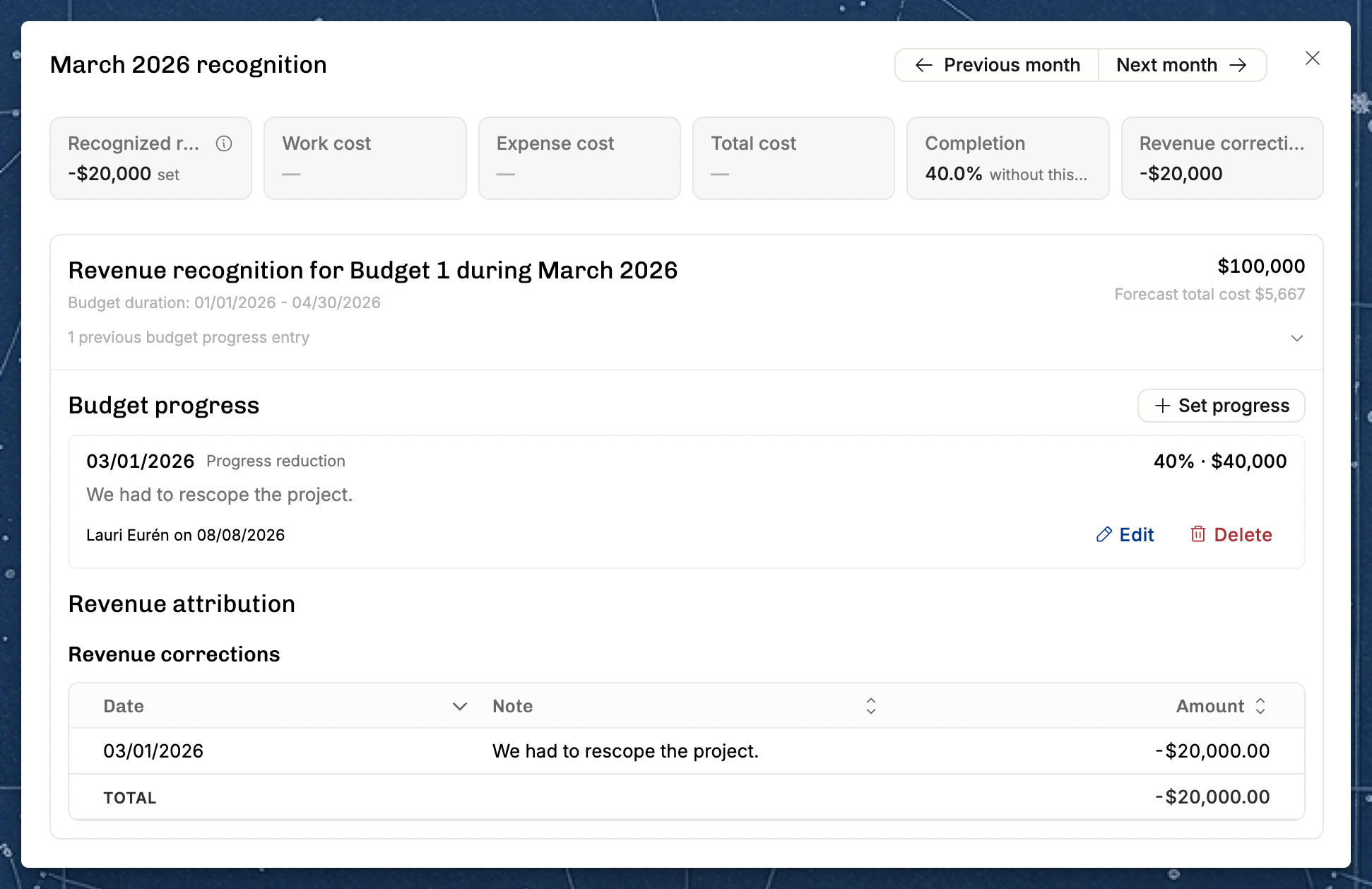
For the mechanics — how the correction amount is worked out, and which earlier entries it locks — see the "Reducing progress" section of How Operating calculates earned and forecasted revenue.
Based on actual vs planned costs (cost-to-cost)
Cost-to-cost derives earned revenue automatically from how much cost the project has incurred, rather than from hours, rates, or a manual judgment. In effect, it calculates budget progress for you, driven by cost.
How it works: Operating compares the cost incurred so far (the cost of tracked time plus billable expenses) against the planned cost for the same budget period. That ratio — actual cost ÷ planned cost — becomes the completion percentage, and the same percentage of the budget value is recognized as earned revenue. The percentage is capped at 100%, so cost overruns never recognize more than the budget value.
An example: A budget of 100,000 EUR is planned to cost 60,000 EUR to deliver. After two months, 18,000 EUR of cost has been incurred. That is 30% of the planned cost, so 30,000 EUR (30% of the budget) is recognized as earned revenue.
When to use it: Cost-to-cost suits projects where incurred cost tracks delivery progress well and you would rather have progress calculated automatically than enter it by hand.
What it needs: A meaningful planned cost. Because completion is actual cost ÷ planned cost, the budget period needs a planned cost for revenue to be recognized while the period is still open. The planned cost comes from planned (allocated) work and planned expenses.
If an open period has no planned cost, no revenue is recognized for it until the period ends. This method therefore depends on cost rates being configured. See How to set up cost rates.
When costs are capped: If a person's Site caps personnel costs, the capped cost is what counts as the cost incurred. So the completion percentage follows the capped figure rather than the raw tracked hours. See How cost capping works.
Evenly by month or week
The simplest method. Revenue is distributed across every month (or week) in the budget's date range.
How it works: With Evenly by month, each month that the budget fully covers earns an equal share of the budget value. With Evenly by week, each full week does. A month or week that the budget covers only in part earns a smaller share, in proportion to the weekdays it covers.
The amount does not depend on how many hours were tracked or how the team was staffed.
An example: A 120,000 EUR budget covering January through June (6 months) earns approximately 20,000 EUR per month.
When to use it: This works well for fixed-price projects where the work is expected to be roughly uniform month to month. It is also useful when you do not need person-level revenue attribution and want a predictable, easy-to-explain number. When the client pays a recurring fee for each period, use the retainer billing type: see How retainers work in Operating.
Limitation: It does not reflect actual delivery pace. If the project is front-loaded or back-loaded, the earned revenue will not match reality until the project completes.
When a milestone is completed
Revenue is recognized one milestone at a time. Each milestone carries a value, and that value is recognized on the day the milestone is completed.
How it works: You give each milestone a revenue recognizable amount on the budget that covers its target date. When you mark the milestone as completed, Operating recognizes that amount on the completion date.
Billable expenses in the period are paid first from the milestone's value, and the rest stays on the milestone. Time entries earn no revenue of their own, and you don't set budget progress by hand.
An example: A budget of 100,000 EUR runs from January to June, with three milestones:
Discovery report: 30,000 EUR.
Prototype: 30,000 EUR.
Final delivery: 40,000 EUR.
The team logs time from January, but nothing is recognized until the discovery report is completed on 15 March. On that day, 30,000 EUR is recognized.
When to use it: This suits contracts that pay for deliverables, where revenue should follow what the client has accepted rather than the hours worked.
Limitation: Nothing is recognized between milestones, so months without a completed milestone show costs but no revenue. Budget amount that no milestone claims is not recognized, even after the budget's end date. A milestone that is delivered but not marked as completed keeps its revenue out of your reports.
For the setup, see Milestone-based revenue recognition and invoicing.
Choosing a fixed-price method
For contracts that pay for deliverables, choose When a milestone is completed. It recognizes revenue per milestone, when you mark each milestone as completed.
New organizations start with Automatic: Based on tracked time, up to the budget amount, which needs no monthly input. If tracked time is a poor measure of delivery, choose Based on actual vs planned costs (cost-to-cost). It calculates budget progress automatically from the cost of tracked time and billable expenses against the planned cost, so you never set budget progress by hand.
Revenue still goes to the people who did the work, in proportion to their cost. The method needs cost rates and allocations that give each budget a planned cost.
Your organization's Fixed-price forecast method setting decides how these methods forecast future periods — see How to choose a fixed-price forecast method.
The When a milestone is completed method is the exception: its forecast follows the milestones' target dates.
The Automatic: Based on tracked time, up to the budget amount method does not use the setting either. Its forecast spreads what is left of the budget across future periods in proportion to their planned revenue.
Capped time and materials
Capped time and materials is a separate billing type rather than a fixed-price method, but it recognizes revenue against budgets too, so it belongs in the same picture.
How it works: Work is billed by actual hours and rates, exactly like time and materials. Each budget caps the revenue that the work earns, either at an amount or at a number of billable hours. Revenue accumulates against the cap as work is tracked. Once the cap is reached, additional work is still tracked and planned but earns no further revenue.
The order in which revenue fills the cap is:
Billable expenses consume the budget first when the cap is an amount. A cap by hours does not limit expenses.
Work that has already been invoiced keeps its earned revenue and counts against the cap first, so recalculations never change what you have already billed.
The rest of the work fills what is left of the cap. Confirmed work goes first, then tentative work. Within each, work goes by date, and on the same date the entry with the cheapest rate goes first.
Each entry earns its full time value until the cap runs out. The entry that crosses the cap earns the value of the part that fits, and later work earns zero.
Each budget caps independently. Unused room in one budget does not roll into the next, and work that falls outside every budget's date range earns zero. Because the budget is the cap, a capped time-and-materials project must have at least one budget. For the full billing-type comparison and invoicing behavior, see What are the billing types?.
Hour cap: A budget can cap billable hours instead of an amount. Every billable hour counts toward the cap, whatever its billing rate. Hours tracked past the cap earn nothing.
Invoiced work uses up the hours that its earned revenue paid for. The entry that crosses the cap earns the time value of the hours that fit. Billable expenses don't count toward an hour cap and keep their full invoice amount.
When you open the calculation of a time entry on a budget capped by hours, a Cap hours remaining row shows how many of the cap's hours were left before that entry.
Retainer
Retainer is also a separate billing type. The client pays a fixed fee for each period, and each period is one budget, so it belongs in the same picture.
How it works: Operating spreads each period's fee evenly across the period's weekdays, so a quarterly fee spreads across the three months of the quarter. The fee is earned whether or not anyone tracks time, and it stays on the period's budget, not on time entries.
Hours within the period's included hours earn no revenue of their own. Hours past them are overage and earn revenue at their billing rate, on top of the fee. Billable expenses are earned in full on top of the fee.
There is no recognition method to choose, and you do not set budget progress. See How retainers work in Operating.
How budgets interact with revenue recognition
A fixed-price or capped time-and-materials project must have at least one budget for revenue recognition to work. The budget defines the total value that the recognition method distributes (for fixed-price) or caps (for capped time and materials).
Single budget
Most projects have one budget covering the entire engagement. Revenue recognition applies to this budget over its full date range.
Multiple budgets
A project can have multiple budgets — for example, a follow-on extension or a contract amendment — each with its own date range and value. Budgets may not overlap in time. Revenue recognition applies independently to each budget within its date range.
For example, a project might have an initial budget of 120,000 EUR (April–August) and a follow-on budget of 80,000 EUR (September–December). Each budget's value is distributed (or capped) separately within its respective period.
Work outside of budget periods earns zero revenue
Revenue recognition only applies within the date range of a budget. If a person tracks time during a period that falls outside any budget's date range, that work shows zero earned revenue — even though it incurs costs.
This matters in practice. If the team starts work before the budget period begins, or continues after it ends, those hours show up with costs but no revenue. The project's margin will then look worse than expected.
To avoid this, make sure your budget dates cover the full period during which work is expected. If the timeline extends beyond the original plan, either extend the existing budget's end date or add a new budget for the additional period.
On fixed-price projects that use the weighted by hours and rates or cost-to-cost method, an Outside budget dates warning on the project page lists this work. See What is a budget? for what the warning shows.
Past fixed-price budgets are automatically considered fully earned
When a fixed-price budget's end date has passed, Operating treats it as 100% complete. All of the budget's value is counted as earned revenue, regardless of whether you set budget progress to 100% and, for cost-to-cost, regardless of whether actual costs came in over or under plan. You do not need to go back and manually set progress to 100% on completed periods.
This applies to all fixed-price methods except When a milestone is completed. On that method, only completed milestones recognize revenue, and budget amount that no milestone claims stays unrecognized after the end date.
Capped time and materials behaves differently. It only ever earns from actual tracked work up to the cap, so a completed capped budget is not automatically filled to 100%. It earns whatever the tracked work was worth, no more than the cap.
How revenue recognition affects reports
The method you choose directly affects several parts of Operating:
Earned revenue — the "actual" side of planned vs. actuals for revenue. Each method calculates this differently, so switching methods mid-project changes how past earned revenue is reported.
Gross profit and margin — since these are derived from earned revenue minus tracked costs, the recognition method affects your profitability picture.
Projected values — Operating's projections for fixed-price projects use the recognition method to estimate remaining revenue. The weighted method is the most responsive, since it factors in actual team composition.
Invoicing — revenue recognition is independent of invoicing. You might recognize 50,000 EUR in earned revenue for a month but invoice the client in a later month, or for a different amount. Earned revenue and invoiced revenue often differ, and that is normal.
What you'll see on the Revenue Recognition tab
A project that recognizes revenue has a Revenue Recognition tab on its detail page. The tab is available on request: email support@operating.app to turn it on for your organization. Once it is on, you see the tab when financials are enabled and you have permission to view revenue on the project. Non-billable projects do not have it.
A row of cards at the top of the tab summarizes the whole project. Which cards appear depends on the billing type and the recognition method:
Total recognized — recognized revenue for the whole project lifetime. Always shown.
Total budget — the total of all budgets for the project. Shown for every fixed-price method, for capped time and materials and for retainers.
Total planned — planned revenue from confirmed work. Shown for the weighted by hours and rates method and for time and materials.
Budget remaining — on capped time and materials and on the Automatic: Based on tracked time, up to the budget amount method, the room left before the budget is used. On capped time and materials it reads as over budget once recognized revenue passes the total budget. On time and materials, it is the remaining budget measured against recognized revenue to date.
Hour cap and Hours remaining — on capped time and materials where the budgets cap by hours, these cards take the place of Total budget and Budget remaining. Hours remaining shows the billable hours left before the cap is reached, with the hours used under it.
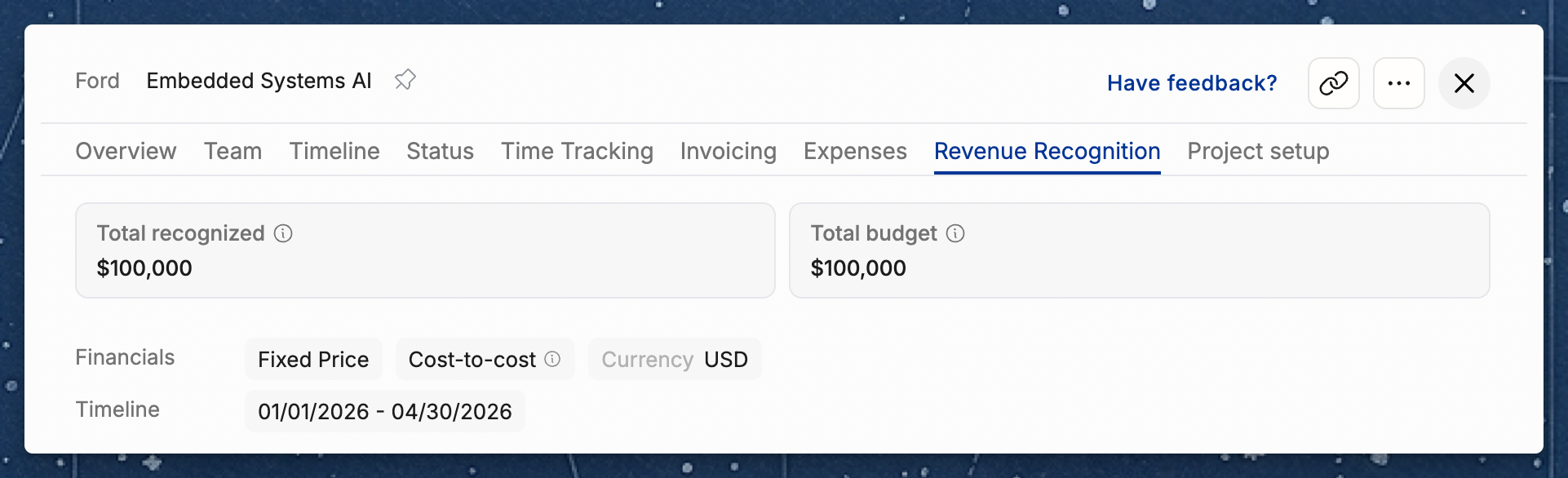
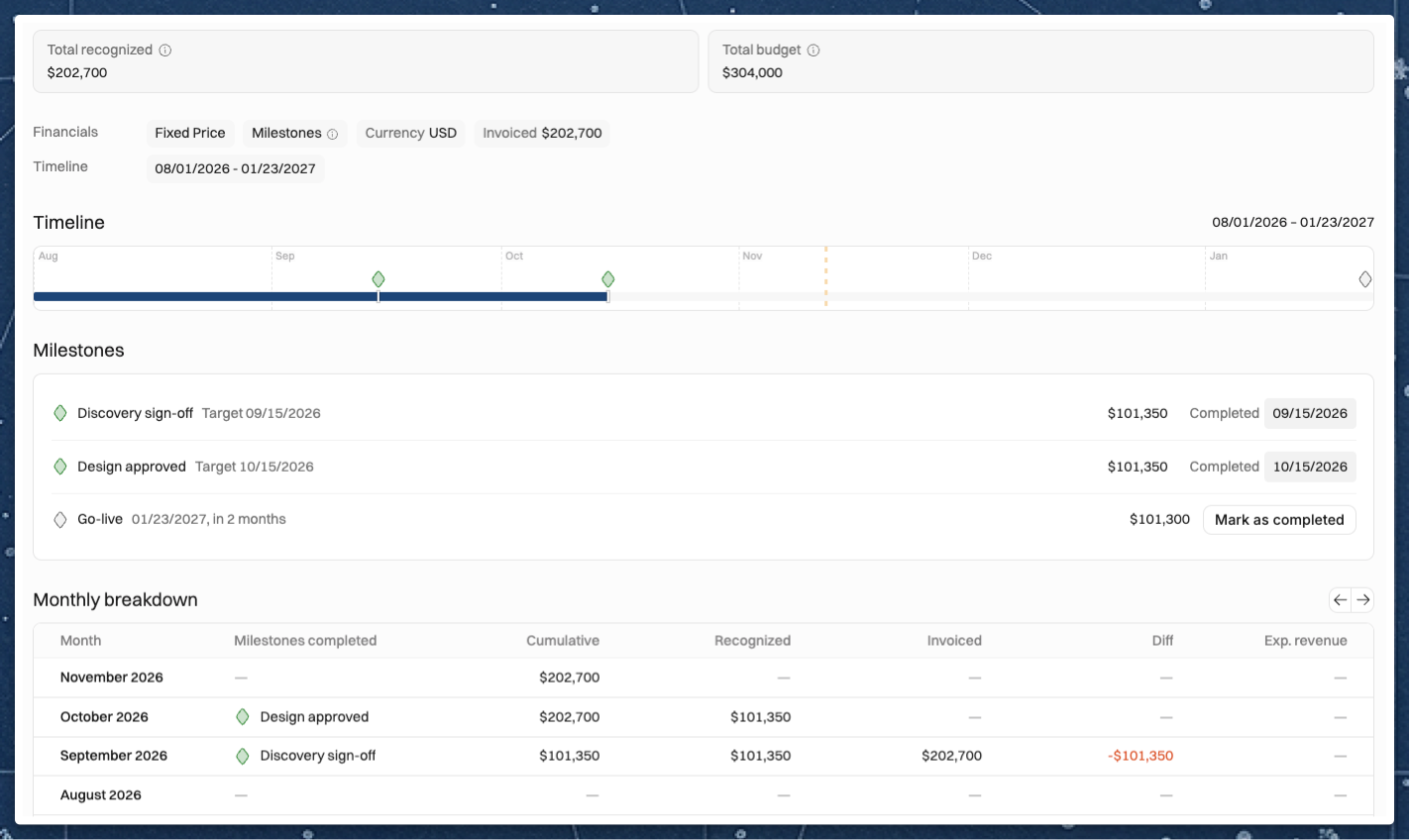
The tab also shows a Timeline of the project's budgets, with a row of milestones when the project has any.
On a project that recognizes revenue When a milestone is completed, a Milestones section follows the Timeline. It lists each milestone that recognizes revenue, with its amount and whether it is completed. Select a milestone to open it. A line under the list shows how much of the budget is not yet assigned to a milestone.
Below them, a monthly breakdown lists the project month by month. Select a month to open its detail view. Two of its columns depend on the method:
Unattributed — on Automatic: Based on tracked time, up to the budget amount. It shows revenue that the budget earned but that no time entry or expense carries, such as what is left of the budget when it ends. A month with unattributed revenue shows an Unattributed revenue card in its detail view.
Milestones completed — on When a milestone is completed. It lists the milestones completed in that month.
Practical guidance
Do not change methods mid-project. Switching recognition methods recalculates earned revenue for all periods, which can create confusing jumps in financial reports. Pick a method at the start and stick with it.
If using budget progress, build it into your routine. The most common cadence is monthly, aligned with your month-end close. Some firms add "update budget progress on all active fixed-price projects" as a step in their close checklist.
If using milestones, mark them as completed on time. Revenue is recognized only when a milestone is completed, so a milestone that is delivered but not marked keeps its revenue out of your reports.
Revenue recognition is about earned revenue, not cash. It does not determine when you invoice or when you get paid — it determines when revenue is recorded in Operating's financial reports. The invoicing schedule is configured separately and controls when invoices are created.
As an example: your account might want revenue to be recognized with the cost-to-cost method, as the work happens, but you could still invoice the project with a milestone-based invoicing method.
Compliance with ASC & IFRS
Is this compliant with accounting standards? Short answer: yes. Every method in Operating matches an approach allowed by the two main revenue standards, ASC 606 (US GAAP) and IFRS 15 (international). The two standards agree on this topic.
Both are built on one simple idea: recognize revenue as you deliver the work, not when you send the invoice. That is exactly what revenue recognition in Operating does. The standards don't require one specific method. They ask you to pick the one that best reflects how work actually progresses on a project, and then stick with it.
How each method lines up
When a milestone is completed fits contracts where each milestone is a deliverable the client accepts. Nothing is recognized between milestones, so choose milestones that follow the work closely.
Retainer projects recognize each period's fee as the period passes, spread evenly across its weekdays, and recognize overage as the hours are worked.
Four habits that keep you on solid ground
Choose the method that matches how the work happens. The table above is a good starting point.
Be consistent. Use the same method for similar projects, and don't change methods mid-project. Consistency is one of the main things the standards ask for.
Keep progress up to date. A monthly review of budget progress, as recommended above, keeps your earned revenue accurate.
Act early on projects heading for a loss. If a project's expected costs exceed its value, the standards expect you to account for the loss straight away rather than when the project ends. The gross profit and margin figures in Operating help you spot this early.
Your accountant has the final say
Operating provides the methods and does the calculations. Which method fits which type of contract is part of your company's accounting policy. If you work with an accountant or auditor, tell them which method you use for which kinds of projects so they can confirm it fits your contracts.
This section is general guidance on how Operating's methods relate to ASC 606 and IFRS 15. It is not accounting advice for your specific situation.
Related articles
Understanding planned vs. actuals — how planned and earned revenue are compared
Introduction to Financials — configuring billing types, budgets, and rate cards
How to set up rate cards — billing rates that drive the "Weighted by hours and rates" method
Budgeting and profitability: a worked example — managing budgets and tracking financial performance
How retainers work in Operating — the fee per period, included hours and overage
Was this helpful?
Still need help? Ask the team