How does Operating decide which rate to use?
How Operating resolves the billing rate for each Position — checking from the most specific source down to a global fallback, in a fixed order.
Written By Lauri Eurén
Last updated 16 days ago
A rate is what you charge a client for one hour of work on a Position. Operating uses it to calculate the revenue of time-and-materials and capped time-and-materials Projects. For your internal cost, see How does Operating decide the cost rate?
A rate can come from four places:
A task-based rate, set directly on the Task assignment in the Project.
A position-specific rate, set directly on the Position.
The Project's Rate card, which sets rates by Role, seniority and Site, and has a base rate for anything it does not price.
Your global average rate, set in Settings.
When more than one of these is set, Operating uses the most specific one, in the order below. Work on a non-billable Role always has a zero rate.
The order Operating checks
For a billable Position on a time-and-materials or capped time-and-materials Project, Operating resolves the rate in this order and stops at the first match:
Task-based rate. When the particular task is used for a time entry, and the task has a task-based rate set, this will take preference. Read more here.
Position-specific rate. A rate set directly on the Position overrides everything else.
The Rate card, by Role, seniority, and Site. Otherwise the Project's assigned Rate card sets the rate. Operating looks the rate up with:
Role: the Position's Role. If the Position has no Role, the assigned Person's primary Role.
Seniority: the Position's seniority. If the Position has none, the assigned Person's seniority in that Role.
Site: the Position's Site. If the Position has none, the Site the assigned Person had on the date of the work. If there is no Person either, the Project's Site.
The Rate card's base rate. If the Rate card doesn't have a rate for that Role and seniority, its base rate applies.
Your global average rate. If the Project has no Rate card, Operating falls back to the global average rate set in Settings, so reports still show revenue instead of blanks.
A task can also carry its own billing rate, applied to the hours logged against that task.
Non-billable and fixed-price work
Non-billable Roles always resolve to a zero rate, whatever Rate card is in place. You can still use rates to estimate how fast you’d eat the budget if the project billing type was T&M.
On fixed-price Projects, the per-hour rate isn't what drives revenue — revenue comes from the Budget and its recognition method, not rate times hours.
Rates that change over time
A Project can carry more than one Rate card across different date ranges, so a Position's rate can change when a new Rate card takes over on a chosen date. Where the rate changed within the period a report covers, Operating shows it as mixed.
A rate can also change when the assigned Person moves to another Site and the Position has no Site of its own. See "Site changes over time" in Sites.
Seeing which rate was used
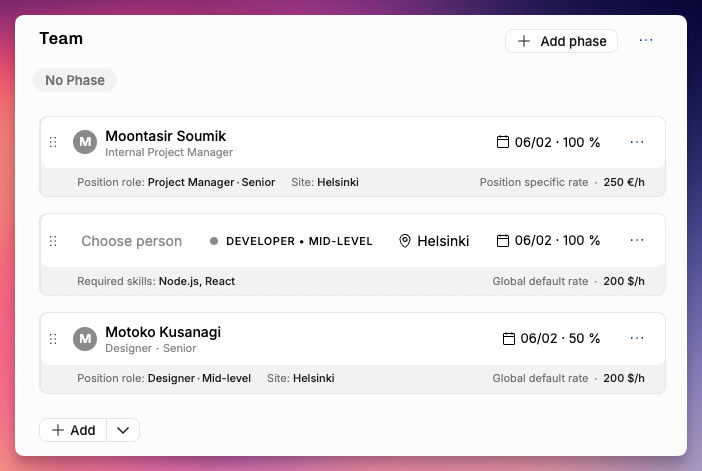
On a Project's Team tab, each Position shows its rate. Hovering over it reveals which of the sources above the rate came from — the quickest way to explain a number that looks wrong.
A worked example
On a Project's Team tab, each Position shows its rate, with an indicator next to it showing which source the rate came from. In this project:
Margaret Hamilton — Project Manager. The rate is 130 US$/h, taken from the Rate card's Project Manager rate. It's the Position's Role that sets this, not Margaret's own primary Role — the source indicator next to the rate confirms it came from the Rate card.
An unnamed Designer position. No Person is assigned yet, but because the Position has a Role, it's priced from the Rate card's Designer rate — 111/h.
Abbie Crosby — no Role on the Position. Here the Position doesn't specify a Role, so the assigned Person's primary Role determines the rate.
To price one Position differently, set a position-specific rate on it — that overrides the Rate card.
Related articles
Was this helpful?
Still need help? Ask the team