What is a budget?
A Budget in Operating is the agreed monetary value of an engagement — the financial target a project is planned and measured against.
Written By Lauri Eurén
Last updated 17 days ago
A Budget in Operating is a monetary amount assigned to a Project for a date range — typically the value you've agreed with the client, as set out in the contract or statement of work for the engagement. It's the financial target the Project is planned and measured against. Budgets matter most on fixed-price and capped time-and-materials Projects, where the Budget sets or caps the revenue; on time-and-materials Projects a Budget is an optional target, and some Projects have no Budget at all.
Operating has a few related financial pieces that are easy to confuse — a Budget, planned Allocations, planned Expenses, and actuals. This article explains what a Budget is and how they fit together.
What a Budget covers
For planning, you can split it into a labor side and an expense side — Operating shows this as the allocation budget vs. the expense budget. Expense budgets earmark category-level envelopes inside the Budget — one per expense category, such as travel or software — and their total can't exceed the Budget, leaving the rest as the allocation (labor) budget. Expense budgets are planning guidelines; they make burndowns and forecasts more accurate but don't block spending or change revenue recognition. To set them, see How to add expenses and expense budgets
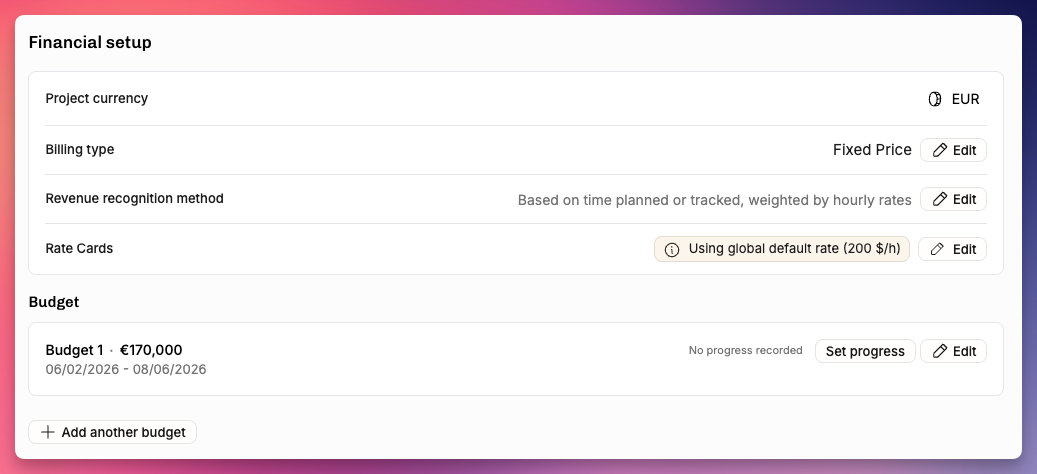
A Project can have one Budget or several — for example, a follow-on extension or a contract amendment — each with its own amount and date range. Budgets may not overlap in time.
Budget vs. plan vs. actuals
This is the distinction worth getting straight:
The Budget is the target — the agreed value of the engagement.
The plan is how you intend to deliver it: planned Allocations (the people and their effort) and planned Expenses (the non-labor costs). On time-and-materials work the plan is also how you expect to reach the Budget; on fixed-price it's your cost of delivering a price that's already fixed.
The actuals are what really happened: tracked Time entries and recorded Expenses.
Comparing the plan and the actuals against the Budget is exactly what the planned-vs-actuals view and the burnup chart show — see Understanding planned vs. actuals.
How the Budget anchors revenue
What the Budget does depends on the billing type:
Fixed-price: the Budget is the agreed price — it's what you invoice, regardless of how many hours the work takes.
Recognized revenue is spread against the Budget over time by the chosen recognition method (and a manual budget progress entry can drive that when completion doesn't map neatly to hours).
Crucially, hours don't add revenue: deliver in fewer hours and you keep more margin; spend more hours and your effective hourly rate — and your margin — simply drop. You could invoice the full Budget having logged very little time.
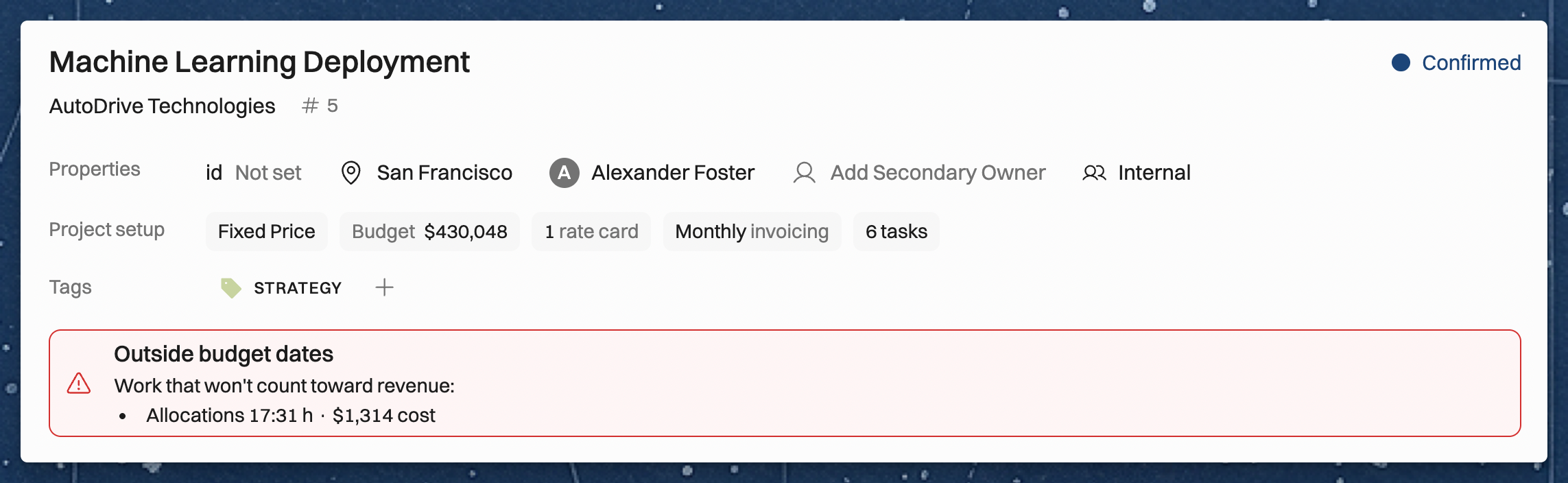
Work outside of the budgets’ date range adds to the costs of the project and affects profitability, but it is not included in revenue recognition. It’s best practice to extend the budget date range so that it covers all of the work allocated and tracked.
When revenue follows the work (the weighted by hours and rates or cost-to-cost methods), Operating warns you about work outside of budgets. An Outside budget dates warning appears on the Project’s Overview, Timeline and Status tabs. It lists the time entries up to the forecast cutoff and the allocations after it, and the Expense line items and planned expenses, that fall outside every Budget’s date range. The amounts are shown as cost for cost-to-cost, and as time value or amount to invoice for the weighted method. If you can’t see costs or revenue, the warning still shows the hours and the number of items, without the amounts.
Capped time-and-materials: the Budget is a hard cap — you bill actual work up to it, and nothing beyond.
If the forecasted work is worth more than the Budget, the Project’s Overview, Timeline and Status tabs show a warning with the amount of work outside of budget scope. On a tentative Project, the warning compares planned work with the Budget.
Time and materials: the Budget is a target to aim for; you invoice actual time, so more billable work earns more — and if the work runs past the Budget, that's the cue to agree an extension with the client rather than leave revenue uncaptured.
Non-billable: there's no client revenue, and no Budgets. Consider your planned allocations the recommended amount of time to spend on the project. You may then compare the planned vs. actual hours in the Projects Reports (see more in Reports available in Operating).
For how those billing types read profitability and margin, see Budgeting and profitability: a worked example; for the recognition methods, see How revenue recognition works in Operating .
Related articles
Metrics glossary — the formulas behind Operating's numbers: Budget, Expense budget, Budget progress.
Was this helpful?
Still need help? Ask the team