Project and client tags
Use project and client tags for reporting and filtering that Groups are not detailed enough for.
Written By Mikko Karjalainen
Last updated 17 days ago
Video - 2 minutes - introduction to Tags
When you feel that the Groups aren’t granular enough for your reporting purposes, add Project and Client Tags.
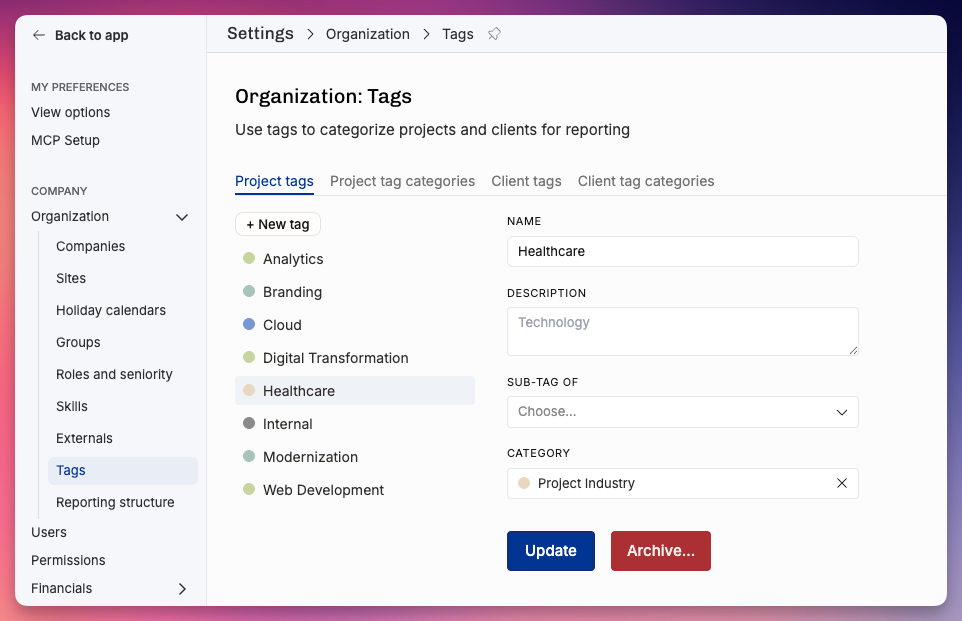
For an IT consulting company, these might be nice project tag categories and example tags inside each category:
project tag category: Project Type
Discovery
Implementation
Continuous Services
project tag category: Service Offering
Design
Software Development
Strategy
You probably want to set the client tags to filter for specific industries and company characteristics, such as:
client tag category: Industry
FMCG
Manufacturing
Energy
client tag category: Location
EMEA
APAC
client tag category: Size
Startup
SME
Enterprise
Filtering by tags
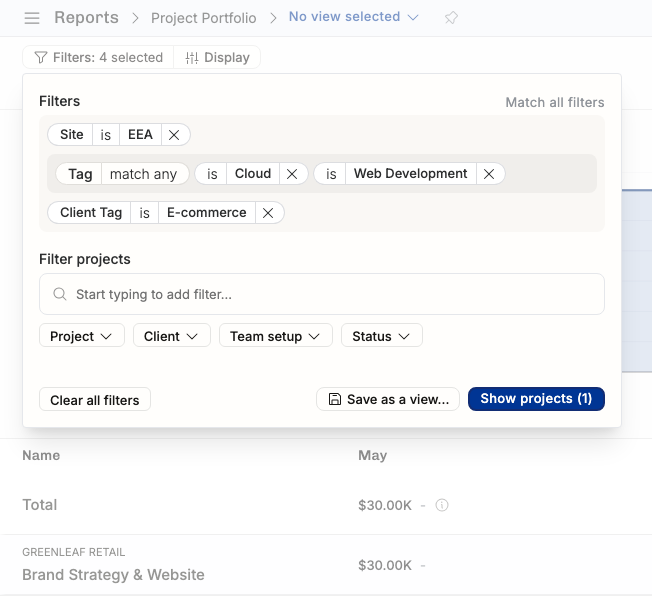
When you’ve added project or client tags, the filtering panel shows them as Project Tag and Client Tag, next to filters such as Site, Group and roles. The panel only offers combinations that would give you results. This example narrows the Projects list down:
Projects that match the following criteria:
Project Tag has either: Cloud or Web Development
Client Tag is E-commerce
Site is EEA
…and you could still narrow it further down, but we can already see that only the rand Strategy & Website project for Greenleaf Retail is the only match.
We can’t wait to hear what kind of reporting solutions you build with these tools! Remember that you don’t want to over-complicate your fundamentally simple business. Add the metadata you will actually use, not more.
Was this helpful?
Still need help? Ask the team