How to create a project
How to create a new project in Operating, setting the client, billing type, status, and other key fields.
Written By Lauri Eurén
Last updated 9 days ago
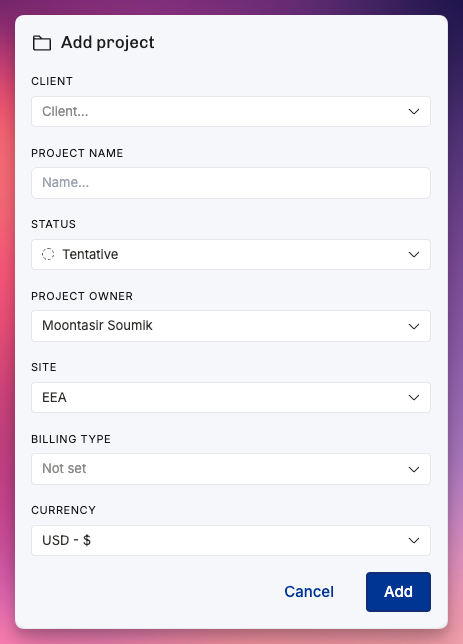
Open the Projects view, select Add project, name it, and select Add.
Projects view → Add project.
Choose a Client (or type a new name to create one); leave empty for internal work.
Enter the Project name (required).
Set Status (defaults to Tentative; use Confirmed when committed).
Optionally set Project owner (defaults to you).
If your org uses them, set Site and Company.
Optionally set Billing type (T&M, capped T&M, fixed price, non-billable) — can change later.
If financials are enabled, set Currency.
Select Add.
Then open the Project to set the team (Positions and Allocations), Budget, Rate card, Tags, Groups, secondary owner, and invoicing schedule.
Projects are also created automatically when a deal is won in a connected CRM — see Salesforce CRM, Pipedrive CRM, and Salesforce CRM.
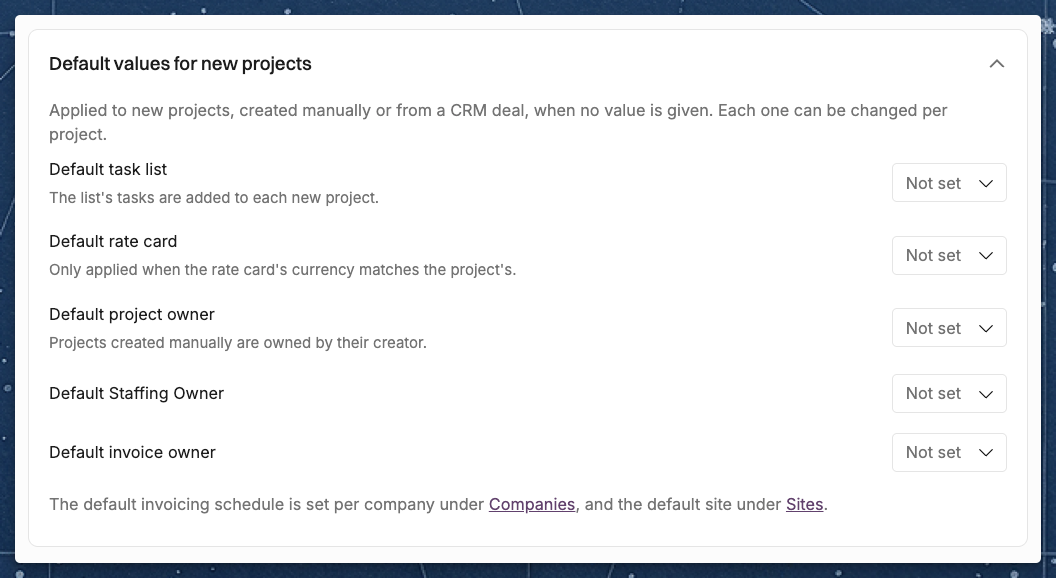
Default values for new projects
Settings > Projects has a Default values for new projects section. Operating fills these values in on every new project, created manually or from a CRM deal, when no value is given, and you can change each of them on the project afterwards. Only users with the Manage company-wide settings permission can change the defaults.
Default task list: the list's tasks are added to each new project.
Default rate card: added only when its currency matches the project's. A Site's own default rate card comes first. This setting is shown only to users who can see revenue, when financials are enabled. See How to set up rate cards.
Default project owner: used when a project is created without an owner, for example from a CRM deal. A project you create manually is owned by you unless you choose someone else.
Default secondary owner: shown only when the secondary owner is turned on, and named after your secondary owner label.
Default invoice owner.
The default invoicing schedule is set per Company in Settings > Organization > Companies, and the default Site in Settings > Organization > Sites.
Was this helpful?
Still need help? Ask the team