How to set up project phases
Project phases let you split a Project into stages — like Design, Implementation, and Launch — and assign Positions to each. This shows you how to create and manage them.
Written By Lauri Eurén
Last updated 13 days ago
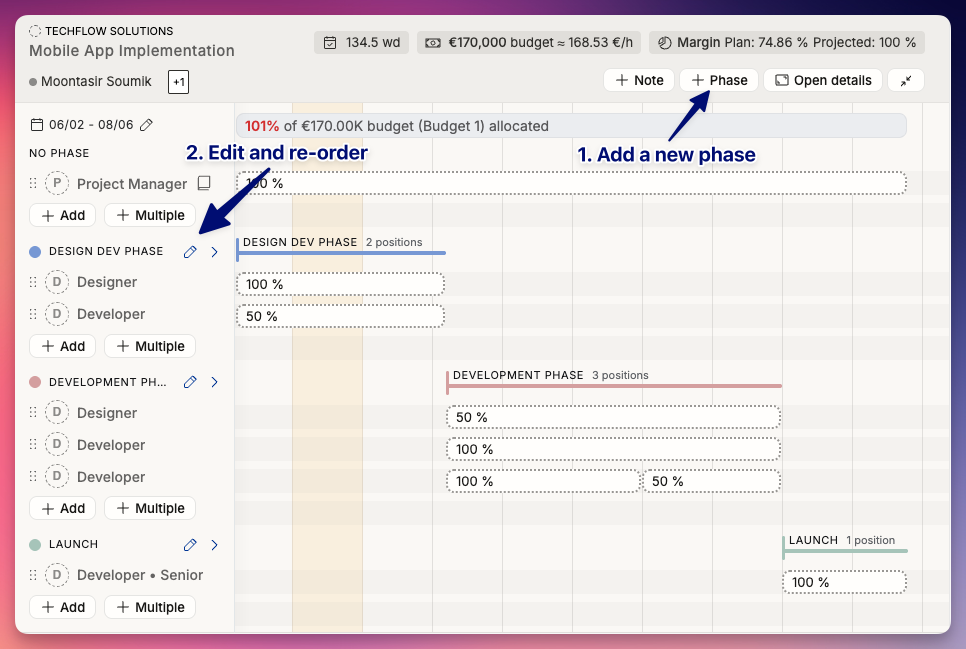
Add a phase
Open the Project on the timeline.
In the project overview bar, click + Phase.
Enter a Phase name and set its Target start date.
To price the phase on its own, turn off Use the project's billing type and budgets and pick its Billing type. A fixed-price phase also gets a Revenue recognition method.
If the Project's timeline has no + Phase button, Phases are turned off for the Project. If the phase form has no Use the project's billing type and budgets switch, Multiple billing types are turned off. See How to turn project features on or off.
Manage a phase
Assign Positions to it. Use the Add button inside a phase to add Positions, so it's clear who works on which stage.
Edit its details. Click the pencil icon next to the phase name to change its name, its target start date or its billing type. To change its color, click the phase name and pick a color.
Delete it. Open the edit panel and click Delete.
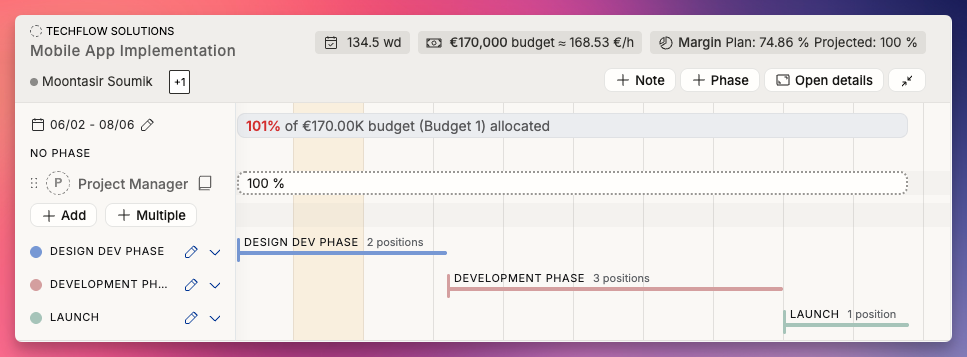
Collapse or expand it. Click the arrow next to the phase name to switch between the detailed view, with Positions visible, and a collapsed bar for a high-level overview.
Keep whole-project work outside the phases
Leave Positions that aren't tied to one stage, like a strategist or analyst, in the Not in a phase section. They apply across the whole Project rather than to a single phase.
See time by phase
Time follows the Position, so any hours logged on a Position assigned to a phase count toward that phase automatically. To view it:
Open the Project's Time Tracking tab.
Click Display.
Turn on the Phase column.
For the full walkthrough, including how overlapping phases appear on the timesheet, see How to track time against a project phase.
Tips
Use phases for project stages, such as Design, Implementation, and Launch.
Keep roles that span the whole project, such as a strategist or analyst, in Not in a phase.
Mark key dates, such as a deliverable or a sign-off, as project milestones.
Related articles
Was this helpful?
Still need help? Ask the team