What is time off?
Time off in Operating is how leave — holidays, vacation, sick days, and other absence — is planned for your people. It removes a person's availability so that capacity, cost, and revenue all reflect when someone isn't working.
Written By Lauri Eurén
Last updated 8 days ago
The Time off project
Every organization has one built-in Time off Project. All leave is planned against it rather than scattered across normal Projects. You can manage time off directly in Operating, or import it automatically from your HRIS so the two systems stay in sync — useful when HR already owns the source of truth for leave.
Full-day vs. partial time off
The two behave differently where they meet planned work:
Full-day time off blocks the whole day for other work. If a Person is allocated to a Project that day, Operating ignores the overlapping work — they can't deliver it while away. Whether the day also leaves the Person's available time depends on its time off category (see Time off categories below).
Partial time off reduces availability proportionally but does not ignore overlapping work. Someone 50% off for a week who also has 100% of project work planned reads as 150% booked — an overbooking signal to look at and resolve, not a number Operating silently absorbs.
Our recommendation is to manually adjust the workload on the days when someone is taking 50% time off.
How time off differs from public holidays
Time off is leave planned per Person. Public holidays are different: they come from the holiday calendars (Holiday calendars (public holidays)) you assign and reduce everyone's day by the holiday's percentage automatically. Both lower available hours, but one is individual and one is calendar-wide.
What time off affects
Time off reduces planned cost and on time-and-materials work, planned revenue. This happens across the days a Person is away, without anyone editing the allocation. How it shows in the Person's capacity (What is capacity and how is it calculated?) depends on its category:
Time off in a category where the Removes from capacity switch is turned on takes the days out of their available time
Other time off counts as booked time. It also feeds a Person's time balance (Time balance (flex)).
Time off categories
Time off categories are the types of time off people plan and track, such as Vacation or Sick leave. They work like tasks in the Time off project. You manage them in Settings → Time tracking → Time off.
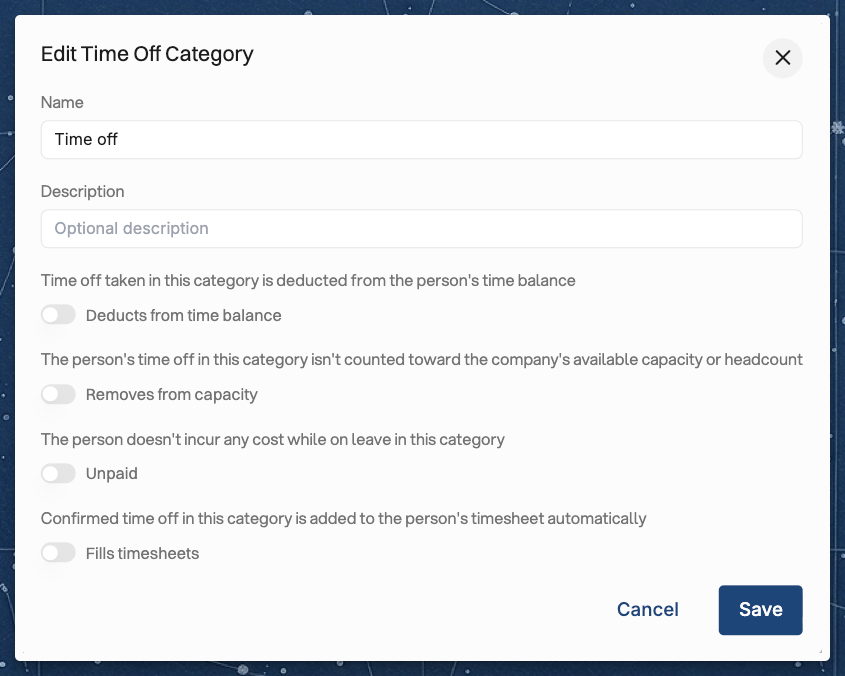
Each category has four switches, which you can turn on in any combination:
Removes from capacity — confirmed full-day time off in this category takes those days out of the Person's available time. The Capacity, Planned vs. actuals and Metrics reports leave the days out, and so does the availability you see when you look for people to staff a Project.
Unpaid — marks the category as unpaid leave.
Deducts from time balance — time off in this category is deducted from the Person's time balance. This setting shows only when time balance is turned on (Time balance (flex)).
Fills timesheets — confirmed time off in this category is added to the Person's timesheet automatically. On the Public holidays category, public holidays from your holiday calendars are added as well. See How to fill timesheets automatically with time off and public holidays for how the entries are made.
The Attributes column in the category list shows which settings are turned on for each category.
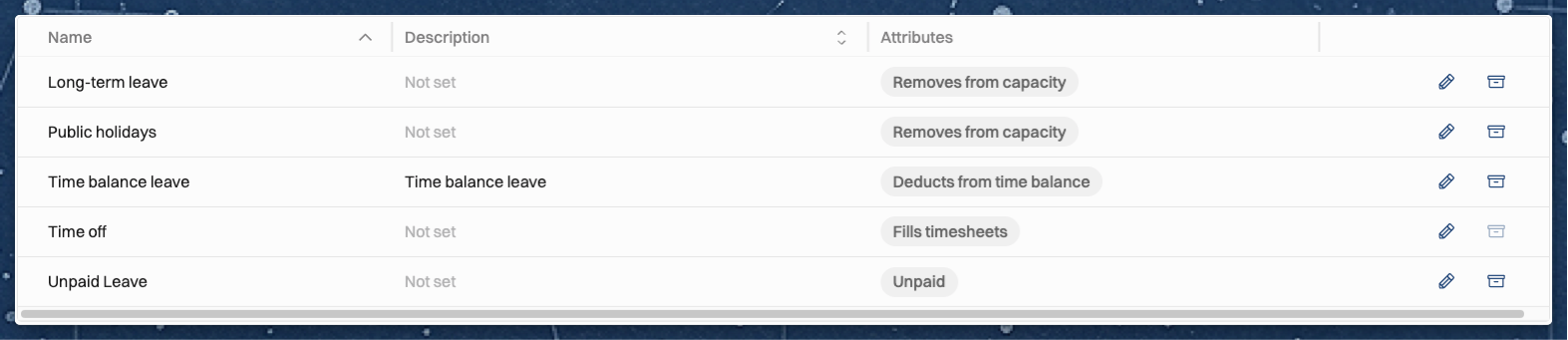
A new workspace starts with three categories:
Time off — the default category, with no settings turned on.
Public holidays — with Removes from capacity turned on.
Long-term leave — for extended absences such as parental leave or a sabbatical, with Removes from capacity turned on.
If you turn on time balance (Time balance (flex)), Operating adds a Time balance leave category with Deducts from time balance turned on, unless a category that deducts from time balance already exists. You can add your own categories and change the settings of any category, so check the Attributes column to see how your workspace is set up.
Time off without a category, such as time off brought in through an integration, is treated as the Default time off category you choose under Time off automation on the same settings page.
The category and note of a person's time off are private. The Time off details permission in a permission set decides who sees them: See all, or See only their own, which covers the user's own time off and that of the people who report to them. Someone who can't see a person's category still sees the time off itself, and in Planned vs. actuals those rows and their totals appear under No task. Capacity and availability are the same for every viewer, because the category's settings still apply when the category is hidden.
Merging time off from another platform
If you’re exporting time off time entries from another time tracking platform like Harvest time tracking, you can merge the external time off project to the time off project in Operating. See How to merge Time Off projects.
Related articles
Was this helpful?
Still need help? Ask the team